Freight Invoicing & Reconciliation System
Configurable billing cycles and reconciliation for freight
Overview
At Freight Tiger, I designed the workflow that turns completed transport journeys into invoices. Transporters needed to bill for the work they had done. Consignors, the companies paying for that transport, needed to verify what was delivered, how the freight was calculated, and whether extra charges were justified.
Clients differed in what they billed together, what evidence they needed, and when they reconciled differences. I designed a workflow that could support those policies while keeping each amount traceable to the trip that produced it.
Problem Statements
Business · Keep the invoice traceable to the work
One invoice can cover several vehicles, each with multiple journeys and charges. When an amount is questioned, both companies need to trace it back to the trip, contracted rate, and delivery evidence. If that connection is lost in the cycle total, a single disputed charge can hold up approval of the entire invoice.
Users · Give each reviewer a clear decision
Transporter and consignor executives need to find missing evidence, verify amounts, and flag exceptions. Their managers need to see the results of those checks and decide whether to approve or return the bill. At each handoff, the next person needs to know who owns the issue, which charge is affected, and what still needs to happen.
Variable billing · Support different client rules
One client may bundle a month of trips into one pro-forma and reconcile before issuing an invoice. Another may process invoices in batches of 100 and reconcile after issuance. The product needs to support those differences in grouping, readiness checks, and timing while keeping each adjustment tied to the right charge and document.
How Freight Billing Works
- 01 Complete the journey and confirm delivery — The transporter finishes the trip and submits electronic proof of delivery (ePOD). Operations checks that the trip is complete and that the delivery proof has been received and accepted where the client requires it.
- 02 Work out what the trip cost — The contract sets the base freight using inputs such as route, distance, vehicle type, or weight. The transporter adds charges that arose on the trip, such as detention for waiting to load or unload, and provides supporting evidence. Those charges can differ from what the consignor expects to pay.
- 03 Group the work into a billing cycle — A time-based cycle can run monthly or every 15 days. A count-based rule can collect the first 100 invoices into a batch. In a consolidated setup, a month of eligible freight can become one pro-forma and then one invoice. That pro-forma can cover several vehicles, each with several journeys and their own charges.
- 04 Issue the invoice and track payment — The transporter raises the invoice from the pro-forma when the client uses one. The consignor records partial or full settlement, and both parties can see what has been paid and what remains due. Reconciliation can happen before or after issuance, depending on the client.
- Trip-level charges Journeys across vehicles Vehicle A · 3 journeys Vehicle B · 2 journeys
- Cycle rollup Monthly pro-forma Five eligible journeys in one reviewable total
- Issued document One freight invoice Each amount links back to its journey and charge
Who Checks and Who Approves
The transporter bills for the freight service, and the consignor verifies what it owes. Both sides have an executive who checks the bill or invoice and a manager who approves it. I mapped both handoffs so each person could see what had been checked, what still needed a decision, and whose action would move the bill forward.
- Transporter executive Prepare and check Verify trips, ePOD, rates, and add-ons.
- Transporter manager Approve for submission Review exceptions and authorize sending.
- Consignor executive Verify the invoice Compare charges against the contract and delivery evidence.
- Consignor manager Approve the invoice Review the checks and approve it for settlement.
If a manager needs a correction, the bill goes back to review with the reason and affected charges in context.
How Billing Can Vary by Industry
These examples illustrate possible client configurations. The freight contract and operating process determine which checks and billing rules apply.
Cement · One invoice for a monthly cycle
A cement plant can send multiple truckloads to depots and dealers. If freight is priced by delivered tonne and route, the consignor can check the delivered weight and flag detention separately. The client could consolidate eligible trips into a monthly pro-forma, reconcile the exceptions there, and issue one invoice for the cycle.
Quick commerce · Billing in high-volume batches
A transporter can run repeated replenishment trips from a hub to dark stores. A client could check completed trips against store receipts, process issued invoices in batches of 100, and reconcile exceptions such as a missing stop or an extra trip against the affected invoice.
Vehicle spare parts · Separate routine and urgent charges
A parts distributor can send routine stock and urgent replacement parts to the same dealer network. A 15-day cycle could group both kinds of trips while keeping expedited surcharges on separate charge lines. If a dealer receipt is missing or a surcharge is questioned, the teams can trace it to the trip and review it on the pro-forma.
Steel · Adjustments after invoice issuance
A steel mill can dispatch coils on heavy vehicles and use the recorded weight and vehicle type to check freight. A client could issue the invoice after trip completion and accepted ePOD, then reconcile a later weighment discrepancy or detention claim. An agreed difference would be recorded against the issued invoice through a credit or debit note.
Liquor distribution · Reconcile on the pro-forma
A liquor distributor can require approved ePODs before trips enter a scheduled pro-forma. The commercial team returns mismatched evidence to the transporter with remarks. Both sides review freight and trip charges on the pro-forma, and disputed trips can return for review under a new reference.
Once the charges are agreed, the transporter submits a signed freight invoice. The workflow checks the accounting entries in SAP, processes payment through NewGen, and returns the payment status to Freight Tiger.
What Workflow Mapping Revealed
I mapped the handoffs between transporters and consignors from delivery checks through billing and payment. At each step, I tracked what the next person needed to see and what could send the work back.
A trip could be marked delivered and still be unbillable. Delivery proof might be awaiting approval, or the actual distance could differ from the distance used to calculate freight. The maps also showed that the same charge disagreement could surface at different points. One setup checked charges before a trip entered a pro-forma. In another, both parties reviewed trip charges on a scheduled pro-forma. A rejection could return a specific charge for correction, with the reason carrying into the next review.
How I Turned Different Workflows Into One Product
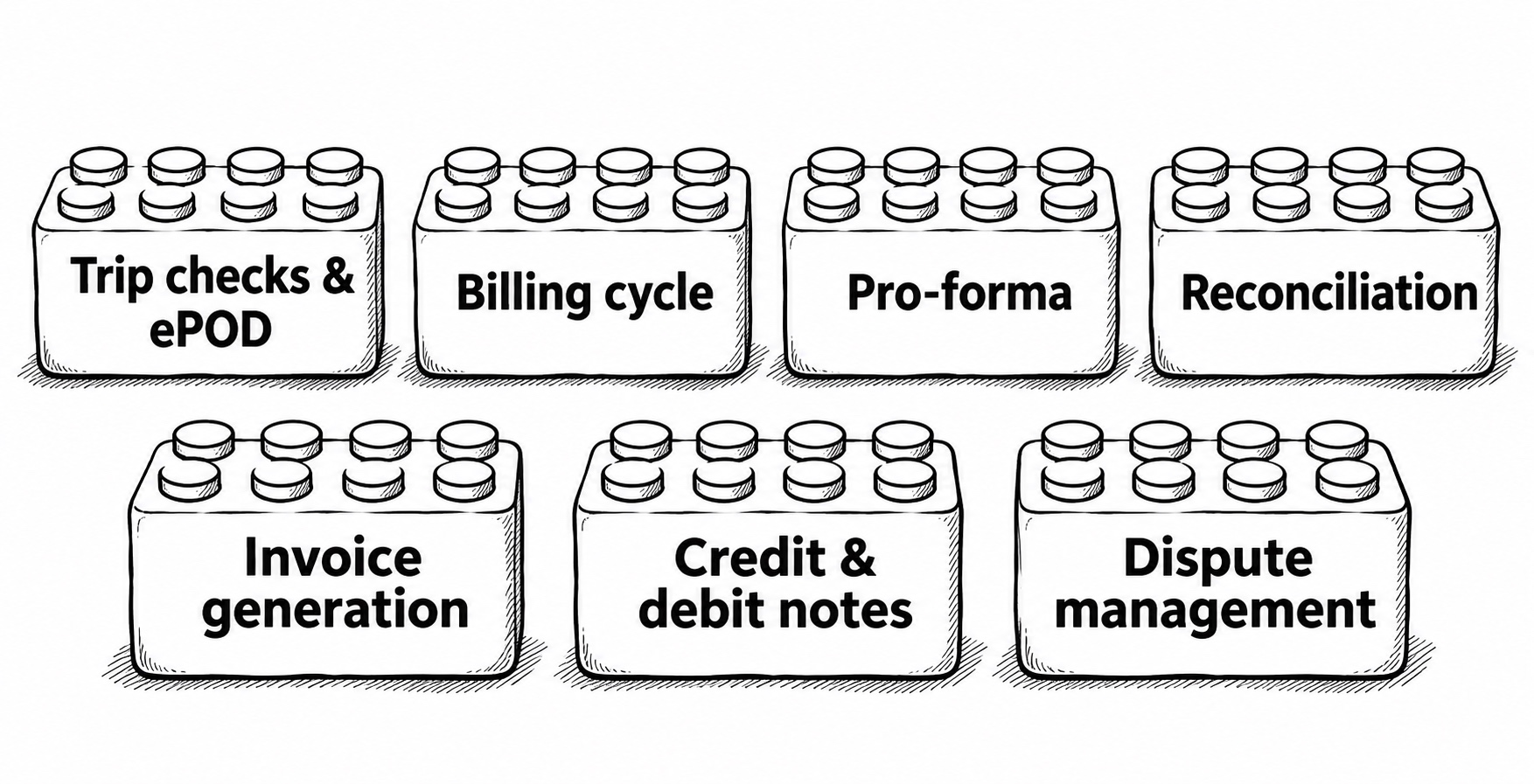
I broke the workflow into reusable blocks, like LEGO pieces. Each block had a job and a clear point at which work could move forward. A client could change the billing cycle, require a delivery check, or place reconciliation at a different point while keeping the same journey, charge, and document records.
Cement · Monthly billing
- Trip checks and ePOD
- Monthly cycle
- Pro-forma
- Reconcile
- Raise invoice
Group eligible trips into a monthly pro-forma. Reconcile weight or detention differences there, then raise one invoice with the agreed charges.
Quick commerce · Batches of 100
- Trip checks and ePOD
- Raise invoice
- Batch 100 invoices
- Reconcile
- Credit or debit note
Check replenishment trips against store receipts and group issued invoices for review. Record an agreed change against the affected invoice through a credit or debit note.
Steel · Disputed charge
- Trip checks and ePOD
- Raise invoice
- Reconcile
- Dispute management
If the parties still disagree on a weight or detention charge after invoicing, send that charge, its reason, and the delivery evidence to dispute review.
- — Trip completion and ePOD — Confirm that the trip ended, then track whether delivery proof was received, accepted, or rejected.
- — Billing cycle — Group eligible journeys or invoices according to the client's time or count rule, with links back to vehicles and charges.
- — Pro-forma — Roll up the proposed charges so both parties can see what would be billed and drill into individual journeys.
- — Reconciliation — Compare contracted and submitted amounts, show the variance, and record a decision on each charge.
- — Invoice generation — Issue the invoice from the eligible charges and retain the links to the underlying journeys and pro-forma where used.
- — Credit and debit notes — Record agreed decreases or increases against an issued invoice and preserve the original invoice.
- — Dispute management — Route unresolved differences for follow-up with the charge, reason, and supporting evidence attached.
When the required checks pass
- Trip completed Delivery is recorded.
- Billing checks pass ePOD is received and accepted, required freight inputs are present, and configured approvals are complete.
- Ready for billing Add to a pro-forma or generate an invoice, depending on the client setup.
When a required check fails
- Hold the journey Show the blocker, such as a rejected ePOD or a missing rate.
- Fix and recheck The responsible team supplies the evidence or corrects the input.
Key Design Trade-offs
When to reconcile
Reviewing before invoice issuance lets both parties settle differences while the bill is still a draft. Some clients need to issue the invoice first. I supported both sequences, using a credit or debit note to document an agreed change against the issued invoice.
What to approve
A single approval for the bill is quick when all amounts agree. When only an add-on is disputed, the reviewer needs a way to accept base freight and challenge that line separately. I kept those decisions on individual charges and showed their status when the bill went back for review.
What to block
I blocked submission when a required check failed and showed the specific reason. Keeping the charge breakdown and other checks visible let the transporter continue reviewing the bill while the responsible party corrected the missing value or delivery proof.
Example Flow for One Client
This Figma walkthrough follows one client setup. Shakthi Logistics prepares journey bills, MDC Labs reviews the charges, and approved journeys can roll into a pro-forma. The frames use sample amounts to show different billing states.
Journey checks and charge preparation
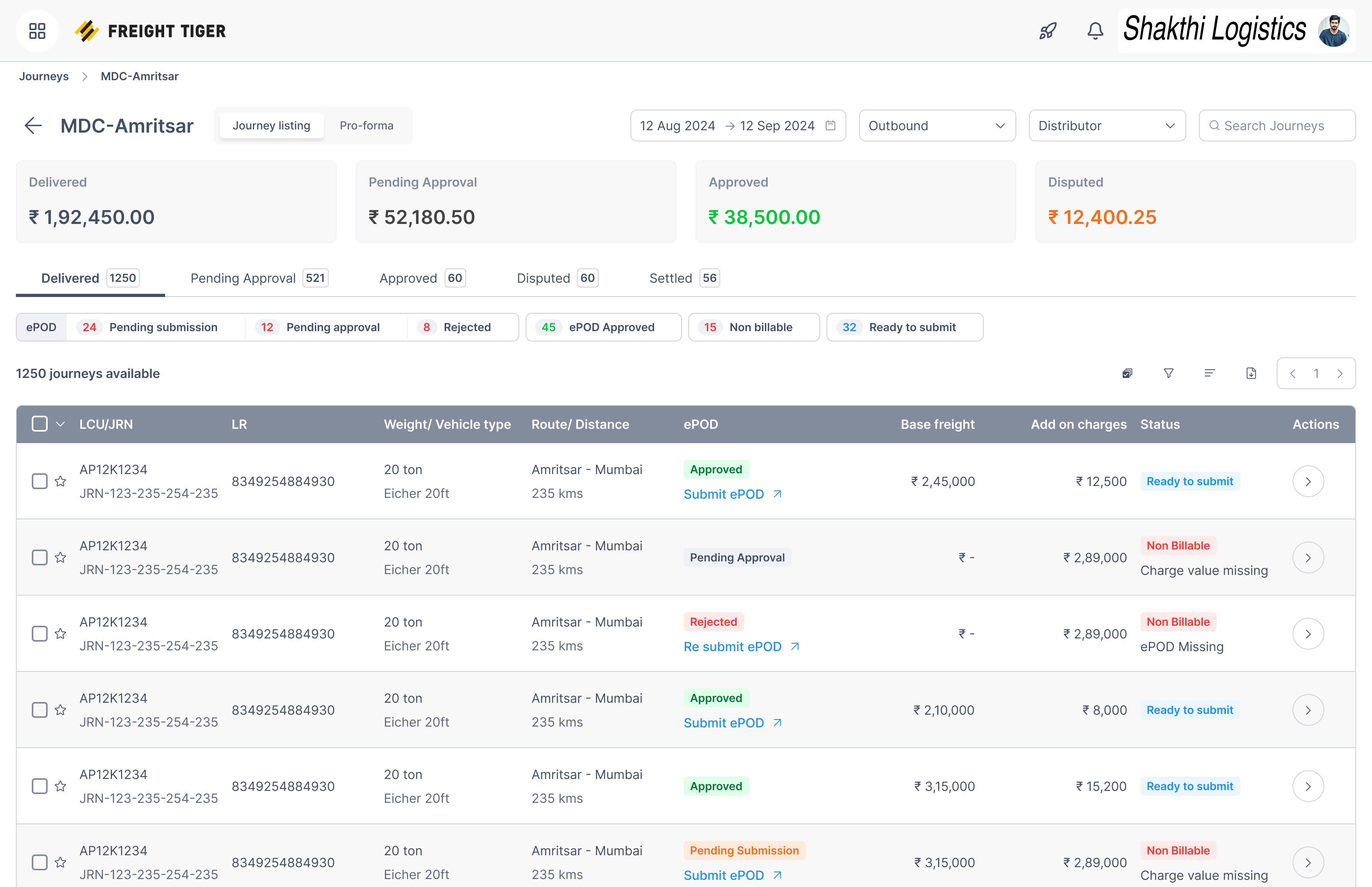
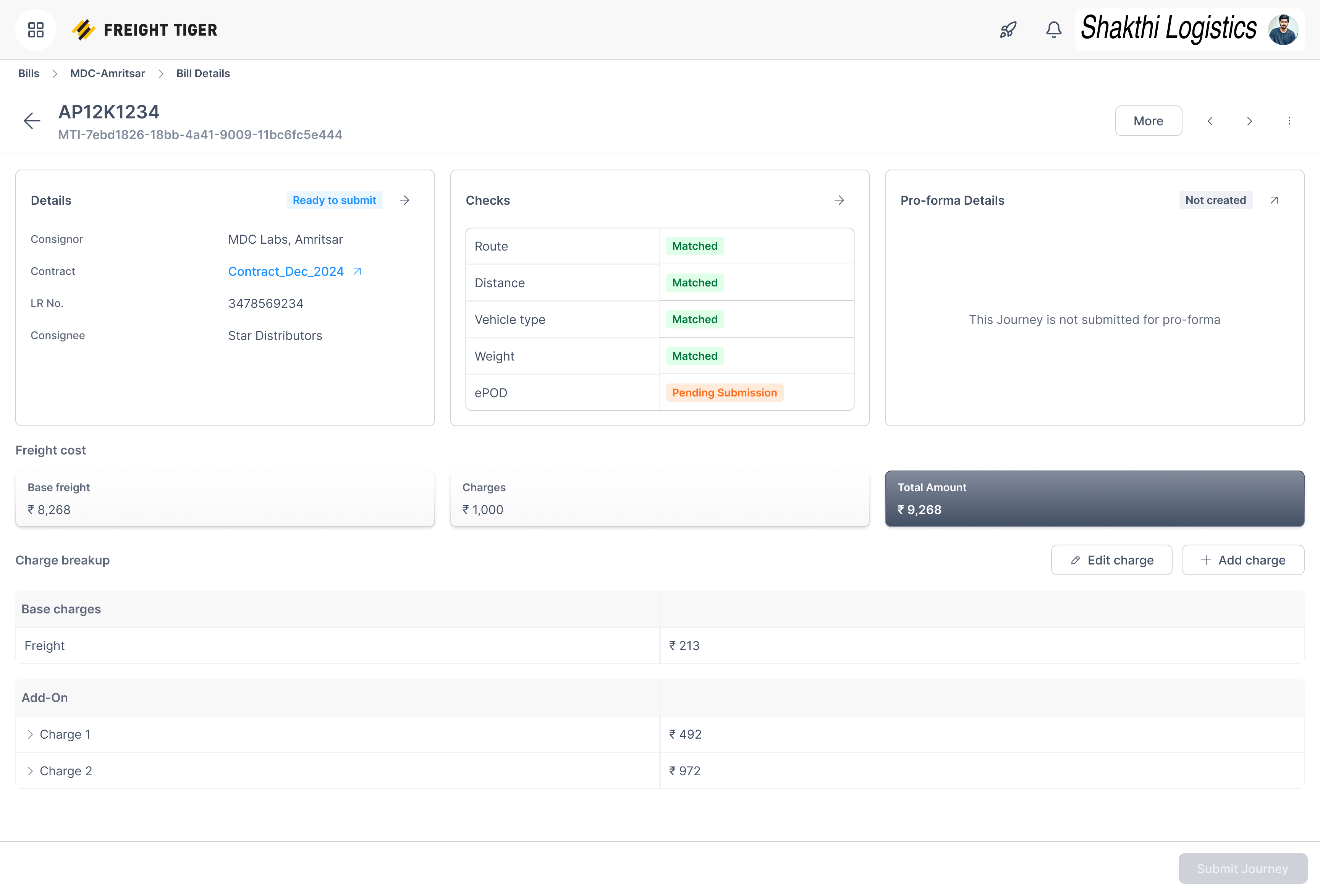
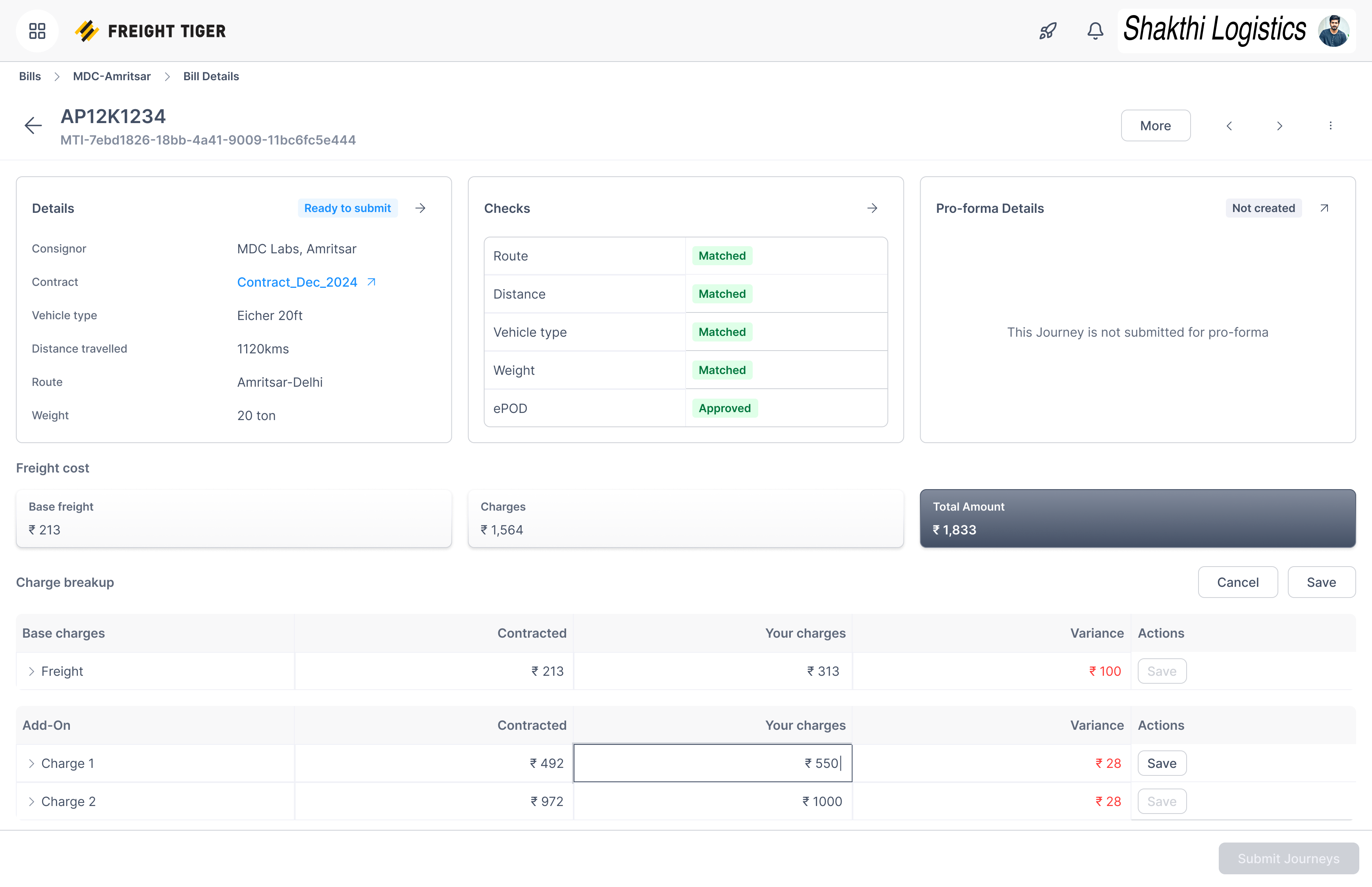
I gave delivery proof and billing readiness separate places in the queue. A trip can be delivered and still need an accepted ePOD or a missing freight value before submission. On the bill, Details identifies the journey, Checks shows what passed, and Pro-forma Details shows whether the journey has been grouped for billing. The transporter can fix a charge in the breakdown while those checks stay in view.
-
Trip checks and ePOD. The ePOD column shows whether delivery proof was accepted, rejected, or still needs review.
-
Billing readiness. The status column shows whether the trip can be submitted and gives the reason when it cannot.
-
Trip checks and ePOD. The Checks panel keeps the matched freight inputs and pending delivery proof in one view.
-
Pro-forma. This panel shows whether the journey belongs to a billing group.
-
Submission gate. The disabled Submit Journey button reflects the pending ePOD.
-
Charge preparation. The transporter can edit a single add-on in its row.
-
Reconciliation. The variance and row-level save action stay next to the edited charge.
Reconcile charges at the point of review
The consignor starts in a queue that shows which side needs to act, then opens the bill to compare contracted and submitted amounts. I separated base freight from add-ons and put the variance and approval action on the same row. The reviewer can accept one charge and question another. A rejection records the reason and moves the bill to Dispute in this setup. The audit trail keeps the original amount, the reason, and subsequent changes available to the next reviewer.
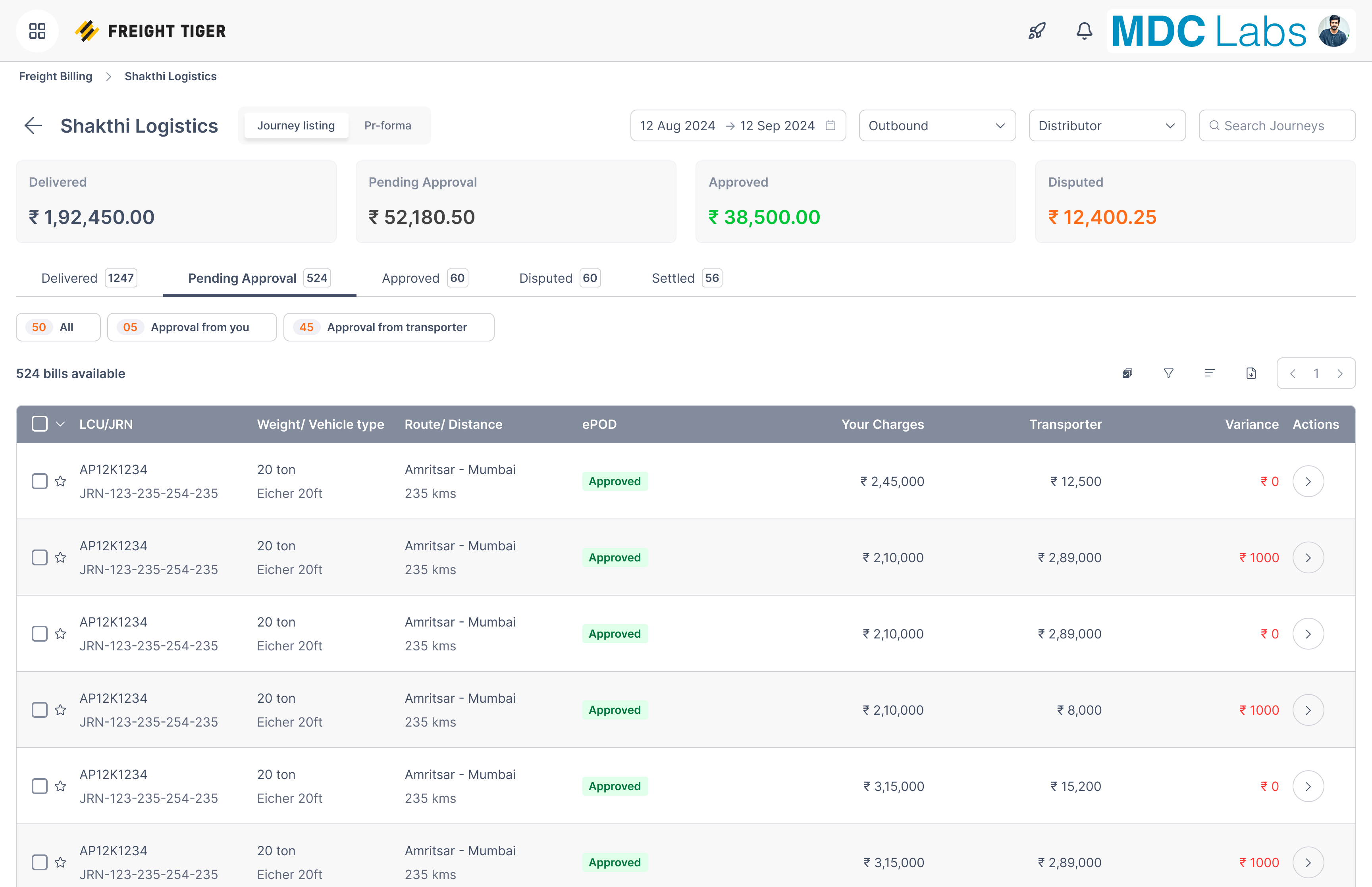
-
Review handoff. The queue filters show which party needs to act next.
-
Reconciliation. The variance column helps the consignor find journeys that need closer review.
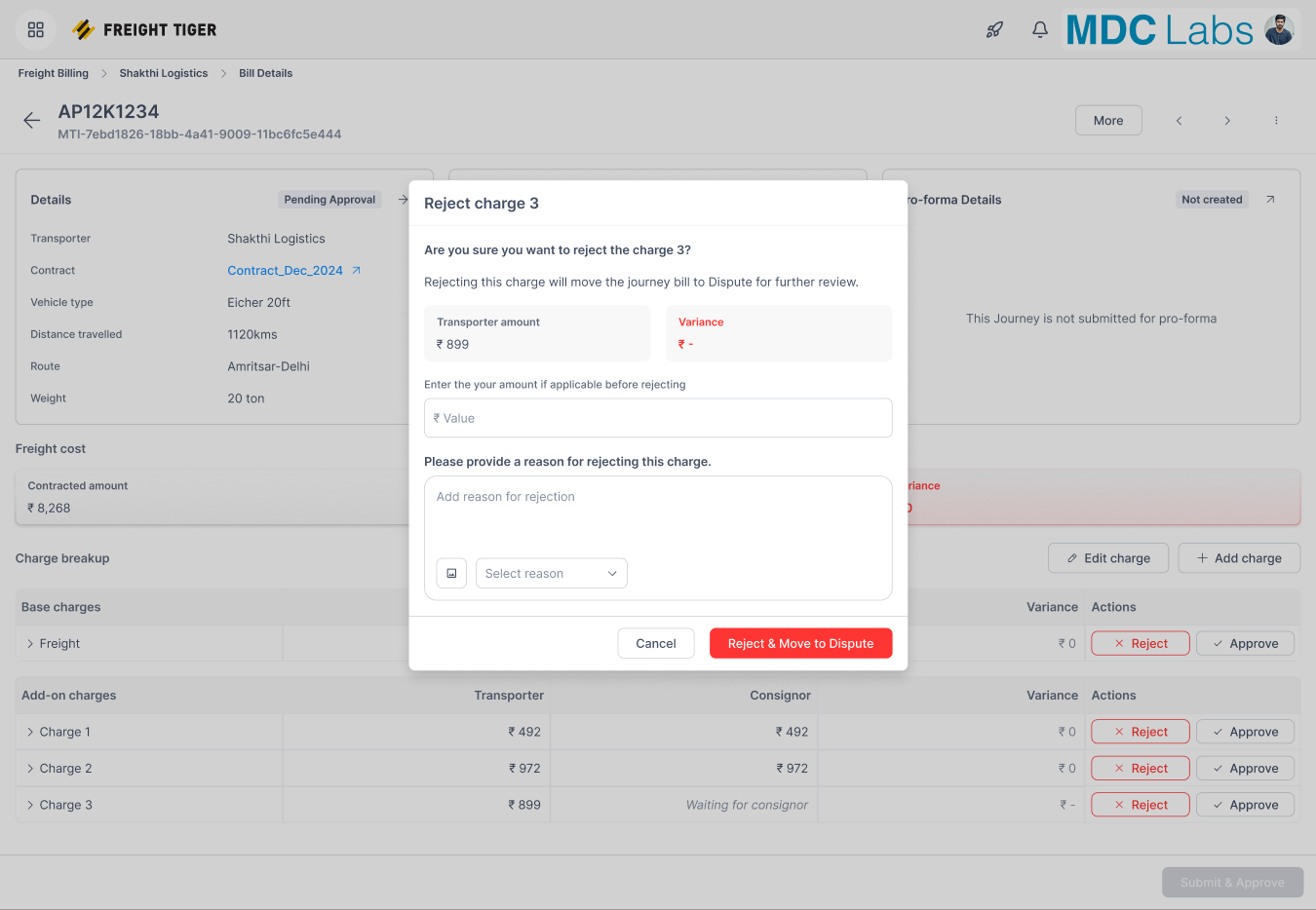
-
Rejection reason. The reviewer records why the charge is being rejected, so the other party can address the issue.
-
Reject & Move to Dispute. Confirming the action moves the journey bill to Dispute for further review.
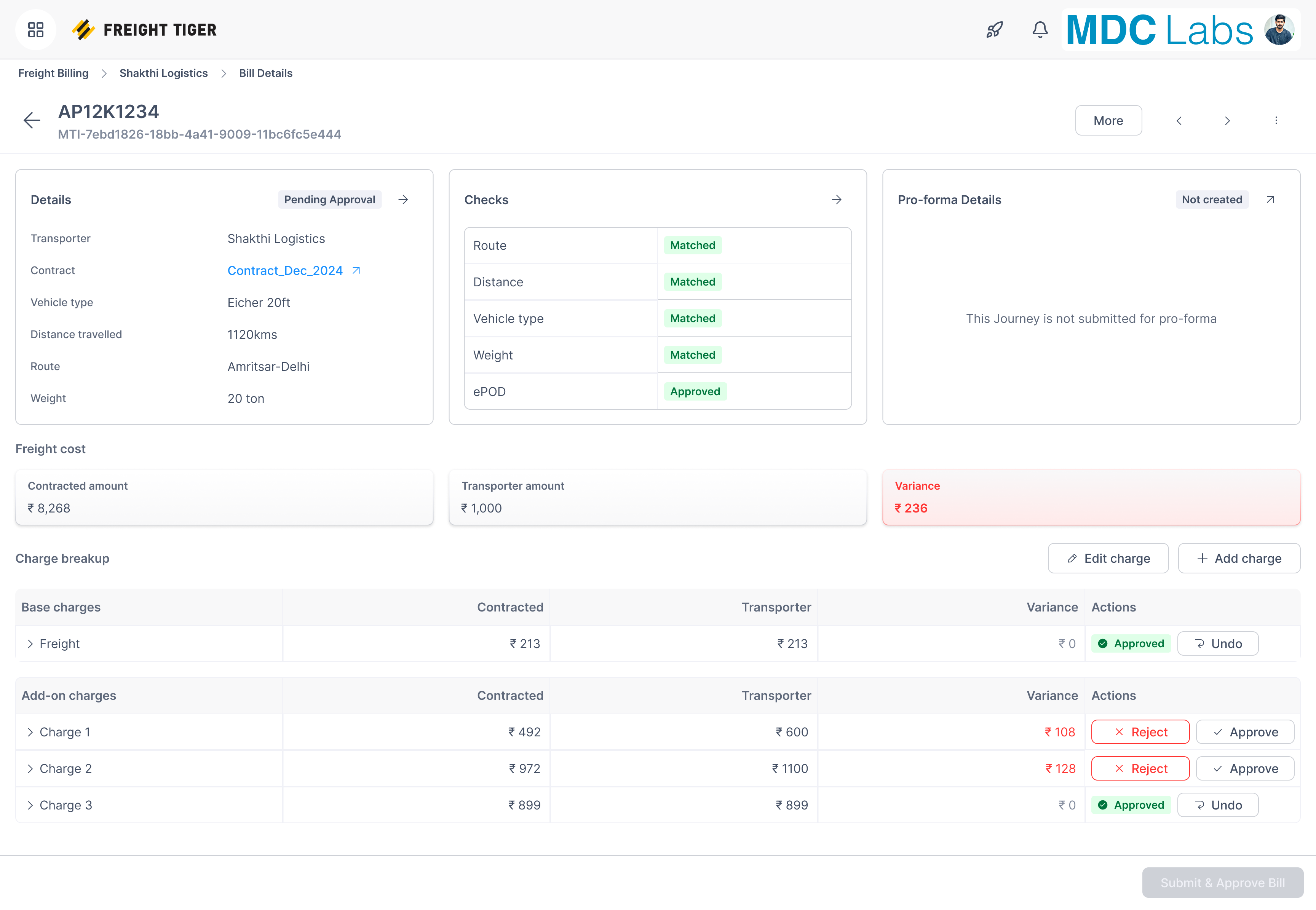
-
Reconciliation. The variance card summarizes the amount in question for the journey.
-
Charge decisions. Approved rows and unresolved add-ons stay visible together so the reviewer can pick up where they left off.
Carry the journey detail into each billing document
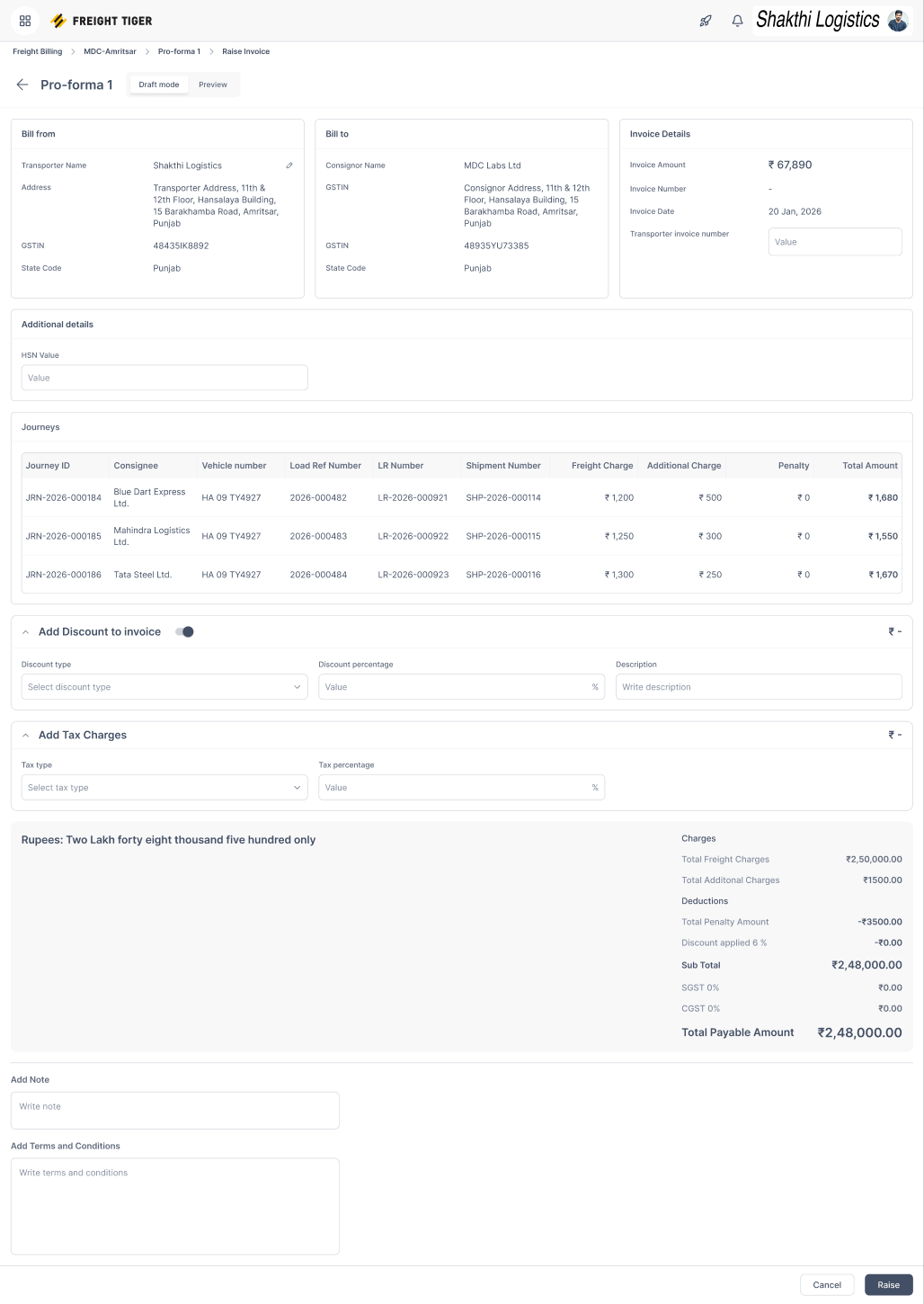
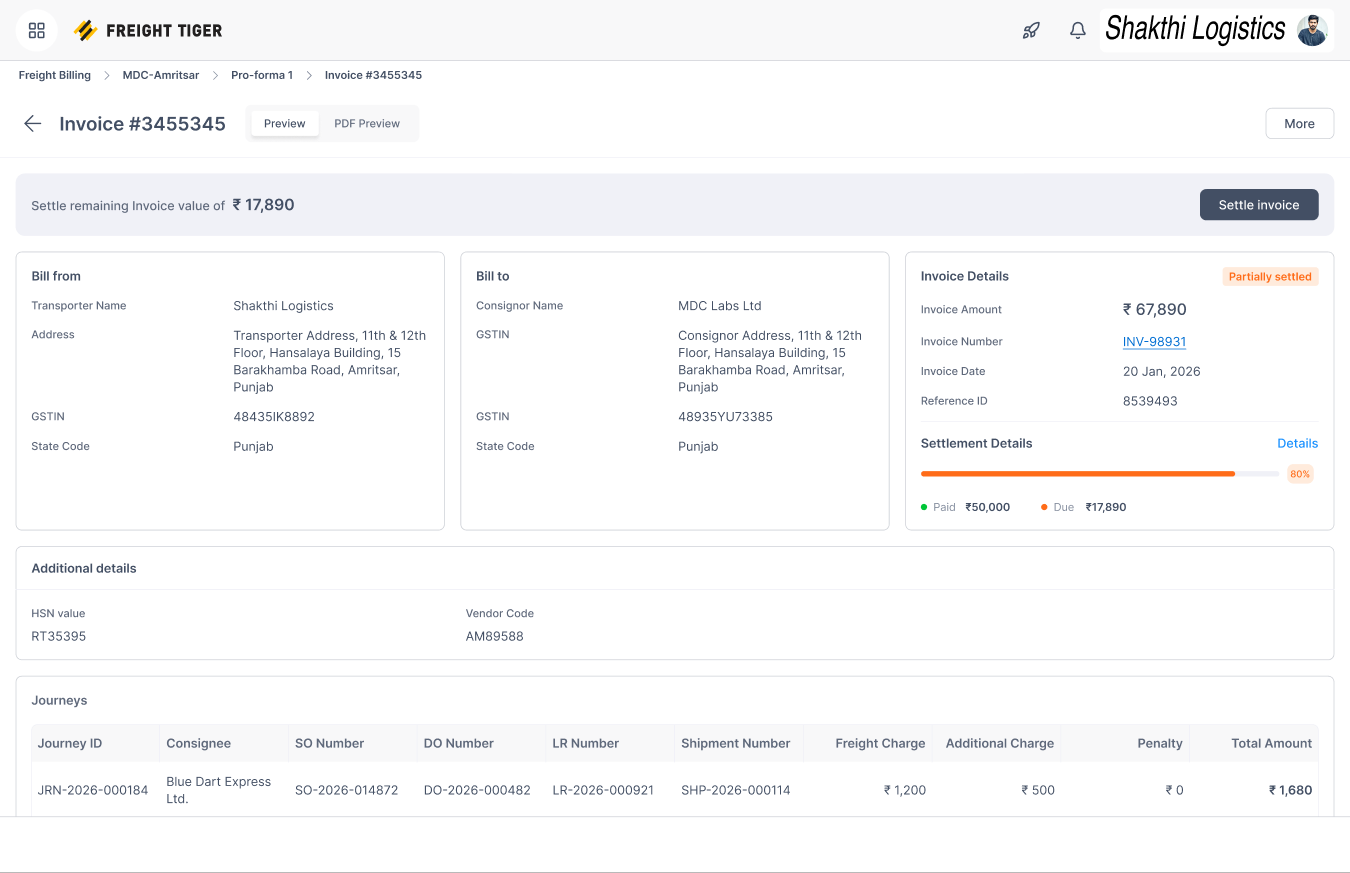
The pro-forma changes the level of detail from one trip to a billing group. I put the approved total above the journey list so the transporter can check the rollup and still open a contributing bill. The invoice draft keeps those journeys in a table, with invoice details, discounts, taxes, and totals in their own sections. Once the invoice is issued, settlement adds the paid and due amounts alongside the invoice details, with the original journeys still visible below.
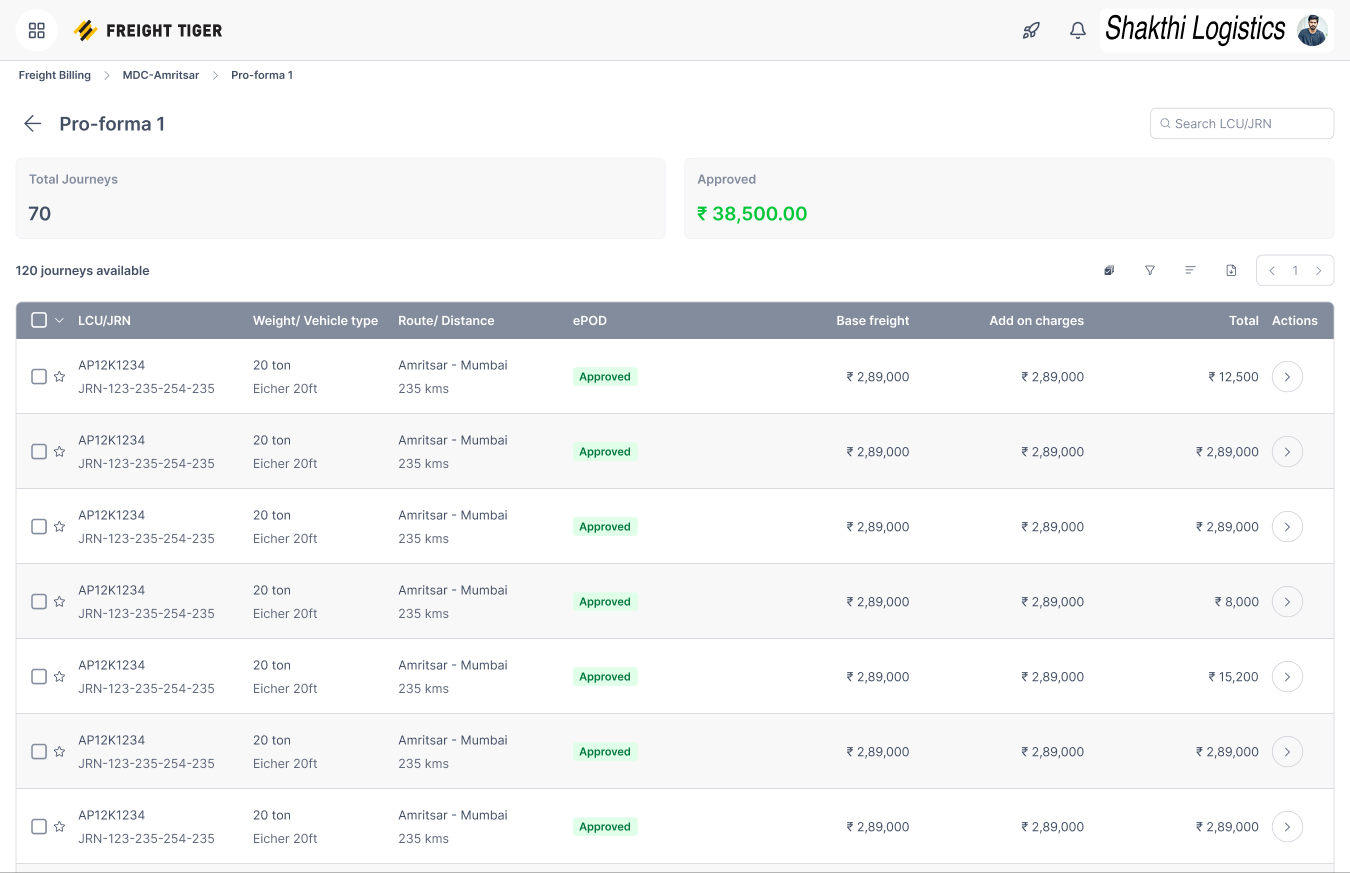
-
Billing cycle and pro-forma. The summary rolls the journey count and approved value up to the pro-forma.
-
Journey traceability. The table keeps each contributing journey and its freight breakdown available beneath the summary.
-
Invoice generation. The Invoice Details panel holds document-level fields for the draft.
-
Pro-forma to invoice. The journey table carries forward the source trips, vehicle numbers, and charges.
-
Draft invoice totals. Discounts, taxes, and deductions are shown separately from the journey charges before the invoice is raised.
-
Settlement action. The banner surfaces the remaining balance and the next action.
-
Settlement details. Paid and due amounts sit inside the issued invoice details.
-
Journey traceability. The journeys that make up the invoice remain available during settlement.
How I Designed the Review Experience
I separated delivery status, billing readiness, and approval. An executive could see why a completed journey was still blocked and fix the underlying input. A manager needed the bill total, the exceptions, and the evidence behind each decision before approving it. The pending-approval queue shows which side needs to act, and the bill detail shows what that action is about.
Why tables and summaries
I used tables for decisions that depend on exact amounts. Aligning the contracted rate, submitted amount, and variance lets a reviewer compare them at a glance and approve or reject that charge from the same row. It also makes it possible to scan several journeys for exceptions before opening one.
Summary cards answer a different question. The approved total and journey count show what has rolled into a pro-forma. The settlement summary puts the amount paid next to what is still due. In both views, the underlying rows remain available when a reviewer needs to explain the total.
Charge row variants
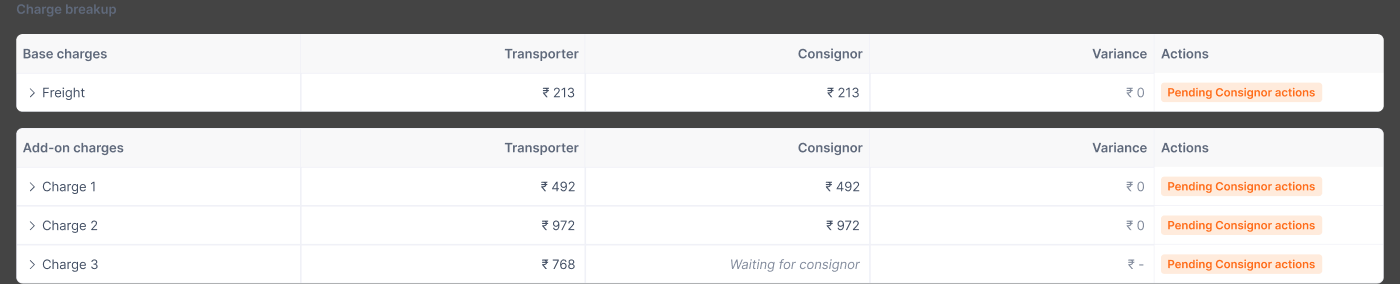
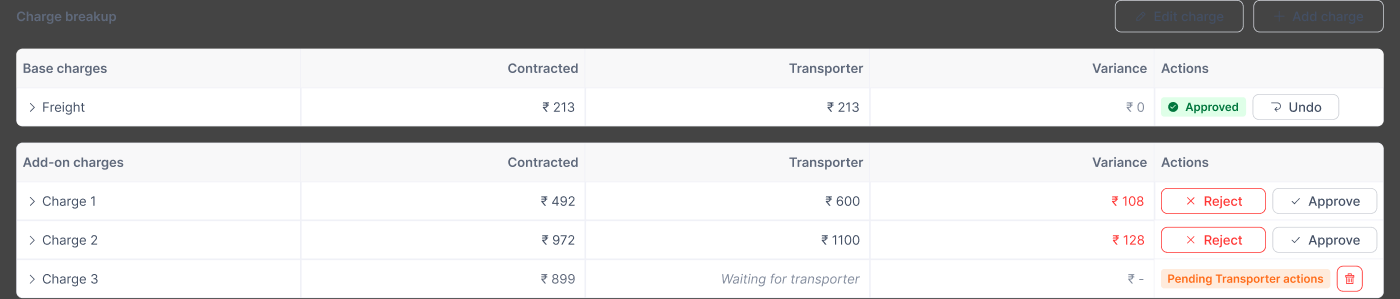
The same row can represent a load charge or a journey charge, and either party can add one. The action cell changes with the state. It can show who needs to respond, offer Approve and Reject, or retain an approval with an Undo action where allowed. Provisional and missing amounts also have their own states.
Pro-forma card states
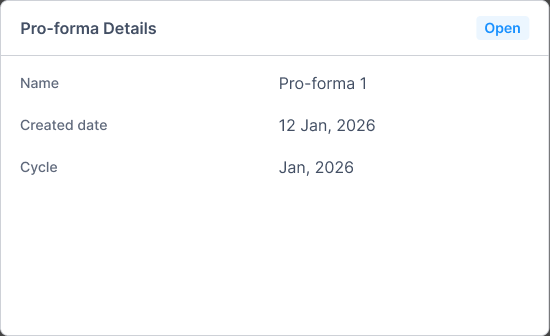
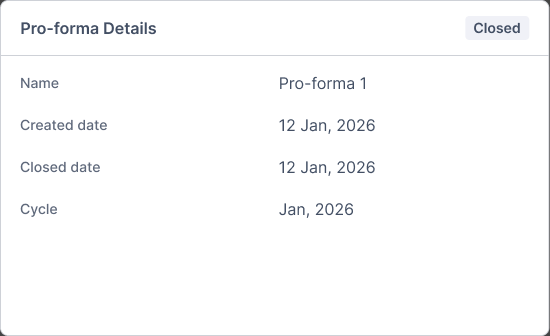
The card gives the pro-forma a consistent place on the bill. Before grouping, it explains that no pro-forma exists. Once open, it shows the reference and cycle. Closing the pro-forma adds the closed date in the same panel.
What I’d Take Forward
The design needed to make ownership as clear as status. A charge marked Pending Approval still leaves work for someone. Showing which party needs to respond, the evidence they should check, and what they can do next gives that status a purpose.
The LEGO-like structure works because each block passes the same trip and charge records to the next step. One client can reconcile charges on a pro-forma before raising the invoice. Another can raise the invoice first and record an agreed adjustment through a credit or debit note. In both cases, a reviewer can follow the amount back to the original charge and delivery evidence.
Proposed success metrics
In a pilot, I’d compare these measures against each client’s baseline and group the results by whether reconciliation happens before or after invoice issuance.
- — Median time from trip completion to invoice issuance.
- — Share of submitted bills returned for missing information.
- — Median time from dispute creation to resolution.
- — Share of review tasks where a reviewer can trace the amount to the original charge without asking the other team.
# Freight Invoicing & Reconciliation System
> Configurable billing cycles and reconciliation for freight

- Role: Senior Product Designer
- Company: Freight Tiger
- Timeline: 2025–26

## Overview

At Freight Tiger, I designed the workflow that turns completed transport journeys into invoices. Transporters needed to bill for the work they had done. Consignors, the companies paying for that transport, needed to verify what was delivered, how the freight was calculated, and whether extra charges were justified.

Clients differed in what they billed together, what evidence they needed, and when they reconciled differences. I designed a workflow that could support those policies while keeping each amount traceable to the trip that produced it.

## Problem Statements

### Business · Keep the invoice traceable to the work

One invoice can cover several vehicles, each with multiple journeys and charges. When an amount is questioned, both companies need to trace it back to the trip, contracted rate, and delivery evidence. If that connection is lost in the cycle total, a single disputed charge can hold up approval of the entire invoice.

### Users · Give each reviewer a clear decision

Transporter and consignor executives need to find missing evidence, verify amounts, and flag exceptions. Their managers need to see the results of those checks and decide whether to approve or return the bill. At each handoff, the next person needs to know who owns the issue, which charge is affected, and what still needs to happen.

### Variable billing · Support different client rules

One client may bundle a month of trips into one pro-forma and reconcile before issuing an invoice. Another may process invoices in batches of 100 and reconcile after issuance. The product needs to support those differences in grouping, readiness checks, and timing while keeping each adjustment tied to the right charge and document.

## How Freight Billing Works

1. Complete the journey and confirm delivery - The transporter finishes the trip and submits electronic proof of delivery (ePOD). Operations checks that the trip is complete and that the delivery proof has been received and accepted where the client requires it.
2. Work out what the trip cost - The contract sets the base freight using inputs such as route, distance, vehicle type, or weight. The transporter adds charges that arose on the trip, such as detention for waiting to load or unload, and provides supporting evidence. Those charges can differ from what the consignor expects to pay.
3. Group the work into a billing cycle - A time-based cycle can run monthly or every 15 days. A count-based rule can collect the first 100 invoices into a batch. In a consolidated setup, a month of eligible freight can become one pro-forma and then one invoice. That pro-forma can cover several vehicles, each with several journeys and their own charges.
4. Issue the invoice and track payment - The transporter raises the invoice from the pro-forma when the client uses one. The consignor records partial or full settlement, and both parties can see what has been paid and what remains due. Reconciliation can happen before or after issuance, depending on the client.

### How one monthly invoice comes together

1. Trip-level charges — Journeys across vehicles. Vehicle A · 3 journeys
Vehicle B · 2 journeys
2. Cycle rollup — Monthly pro-forma. Five eligible journeys in one reviewable total
3. Issued document — One freight invoice. Each amount links back to its journey and charge

## Who Checks and Who Approves

The transporter bills for the freight service, and the consignor verifies what it owes. Both sides have an executive who checks the bill or invoice and a manager who approves it. I mapped both handoffs so each person could see what had been checked, what still needed a decision, and whose action would move the bill forward.

### The invoice review handoff

1. Transporter executive — Prepare and check. Verify trips, ePOD, rates, and add-ons.
2. Transporter manager — Approve for submission. Review exceptions and authorize sending.
3. Consignor executive — Verify the invoice. Compare charges against the contract and delivery evidence.
4. Consignor manager — Approve the invoice. Review the checks and approve it for settlement.

If a manager needs a correction, the bill goes back to review with the reason and affected charges in context.

## How Billing Can Vary by Industry

These examples illustrate possible client configurations. The freight contract and operating process determine which checks and billing rules apply.

### Cement · One invoice for a monthly cycle

A cement plant can send multiple truckloads to depots and dealers. If freight is priced by delivered tonne and route, the consignor can check the delivered weight and flag detention separately. The client could consolidate eligible trips into a monthly pro-forma, reconcile the exceptions there, and issue one invoice for the cycle.

### Quick commerce · Billing in high-volume batches

A transporter can run repeated replenishment trips from a hub to dark stores. A client could check completed trips against store receipts, process issued invoices in batches of 100, and reconcile exceptions such as a missing stop or an extra trip against the affected invoice.

### Vehicle spare parts · Separate routine and urgent charges

A parts distributor can send routine stock and urgent replacement parts to the same dealer network. A 15-day cycle could group both kinds of trips while keeping expedited surcharges on separate charge lines. If a dealer receipt is missing or a surcharge is questioned, the teams can trace it to the trip and review it on the pro-forma.

### Steel · Adjustments after invoice issuance

A steel mill can dispatch coils on heavy vehicles and use the recorded weight and vehicle type to check freight. A client could issue the invoice after trip completion and accepted ePOD, then reconcile a later weighment discrepancy or detention claim. An agreed difference would be recorded against the issued invoice through a credit or debit note.

### Liquor distribution · Reconcile on the pro-forma

A liquor distributor can require approved ePODs before trips enter a scheduled pro-forma. The commercial team returns mismatched evidence to the transporter with remarks. Both sides review freight and trip charges on the pro-forma, and disputed trips can return for review under a new reference.

Once the charges are agreed, the transporter submits a signed freight invoice. The workflow checks the accounting entries in SAP, processes payment through NewGen, and returns the payment status to Freight Tiger.

## What Workflow Mapping Revealed

I mapped the handoffs between transporters and consignors from delivery checks through billing and payment. At each step, I tracked what the next person needed to see and what could send the work back.

A trip could be marked delivered and still be unbillable. Delivery proof might be awaiting approval, or the actual distance could differ from the distance used to calculate freight. The maps also showed that the same charge disagreement could surface at different points. One setup checked charges before a trip entered a pro-forma. In another, both parties reviewed trip charges on a scheduled pro-forma. A rejection could return a specific charge for correction, with the reason carrying into the next review.

## How I Turned Different Workflows Into One Product

I broke the workflow into reusable blocks, like LEGO pieces. Each block had a job and a clear point at which work could move forward. A client could change the billing cycle, require a delivery check, or place reconciliation at a different point while keeping the same journey, charge, and document records.

### Freight billing building blocks

The same seven blocks can be combined according to a client's billing and reconciliation rules.

### Assemble a billing flow

- Cement · Monthly billing: Trip checks and ePOD → Monthly cycle → Pro-forma → Reconcile → Raise invoice
  Group eligible trips into a monthly pro-forma. Reconcile weight or detention differences there, then raise one invoice with the agreed charges.
- Quick commerce · Batches of 100: Trip checks and ePOD → Raise invoice → Batch 100 invoices → Reconcile → Credit or debit note
  Check replenishment trips against store receipts and group issued invoices for review. Record an agreed change against the affected invoice through a credit or debit note.
- Steel · Disputed charge: Trip checks and ePOD → Raise invoice → Reconcile → Dispute management
  If the parties still disagree on a weight or detention charge after invoicing, send that charge, its reason, and the delivery evidence to dispute review.

- Trip completion and ePOD - Confirm that the trip ended, then track whether delivery proof was received, accepted, or rejected.
- Billing cycle - Group eligible journeys or invoices according to the client's time or count rule, with links back to vehicles and charges.
- Pro-forma - Roll up the proposed charges so both parties can see what would be billed and drill into individual journeys.
- Reconciliation - Compare contracted and submitted amounts, show the variance, and record a decision on each charge.
- Invoice generation - Issue the invoice from the eligible charges and retain the links to the underlying journeys and pro-forma where used.
- Credit and debit notes - Record agreed decreases or increases against an issued invoice and preserve the original invoice.
- Dispute management - Route unresolved differences for follow-up with the charge, reason, and supporting evidence attached.

### When a completed trip becomes billable

When the required checks pass

1. Trip completed. Delivery is recorded.
2. Billing checks pass. ePOD is received and accepted, required freight inputs are present, and configured approvals are complete.
3. Ready for billing. Add to a pro-forma or generate an invoice, depending on the client setup.

When a required check fails

1. Hold the journey. Show the blocker, such as a rejected ePOD or a missing rate.
2. Fix and recheck. The responsible team supplies the evidence or corrects the input.

## Key Design Trade-offs

### When to reconcile

Reviewing before invoice issuance lets both parties settle differences while the bill is still a draft. Some clients need to issue the invoice first. I supported both sequences, using a credit or debit note to document an agreed change against the issued invoice.

### What to approve

A single approval for the bill is quick when all amounts agree. When only an add-on is disputed, the reviewer needs a way to accept base freight and challenge that line separately. I kept those decisions on individual charges and showed their status when the bill went back for review.

### What to block

I blocked submission when a required check failed and showed the specific reason. Keeping the charge breakdown and other checks visible let the transporter continue reviewing the bill while the responsible party corrected the missing value or delivery proof.

## Example Flow for One Client

This Figma walkthrough follows one client setup. Shakthi Logistics prepares journey bills, MDC Labs reviews the charges, and approved journeys can roll into a pro-forma. The frames use sample amounts to show different billing states.

### Journey checks and charge preparation

I gave delivery proof and billing readiness separate places in the queue. A trip can be delivered and still need an accepted ePOD or a missing freight value before submission. On the bill, Details identifies the journey, Checks shows what passed, and Pro-forma Details shows whether the journey has been grouped for billing. The transporter can fix a charge in the breakdown while those checks stay in view.

- 1. Find journeys ready for billing: Separate ePOD and billing status columns show what is ready to submit and what still needs attention.
  1. Trip checks and ePOD — The ePOD column shows whether delivery proof was accepted, rejected, or still needs review.
  2. Billing readiness — The status column shows whether the trip can be submitted and gives the reason when it cannot.
- 2. Check what blocks submission: Route, distance, vehicle type, and weight match. Pending ePOD keeps the Submit Journey action disabled, and Pro-forma Details shows that no pro-forma has been created.
  1. Trip checks and ePOD — The Checks panel keeps the matched freight inputs and pending delivery proof in one view.
  2. Pro-forma — This panel shows whether the journey belongs to a billing group.
  3. Submission gate — The disabled Submit Journey button reflects the pending ePOD.
- 3. Edit individual charges: The transporter updates an add-on charge and can compare the entered amount with the contracted rate.
  1. Charge preparation — The transporter can edit a single add-on in its row.
  2. Reconciliation — The variance and row-level save action stay next to the edited charge.

### Reconcile charges at the point of review

The consignor starts in a queue that shows which side needs to act, then opens the bill to compare contracted and submitted amounts. I separated base freight from add-ons and put the variance and approval action on the same row. The reviewer can accept one charge and question another. A rejection records the reason and moves the bill to Dispute in this setup. The audit trail keeps the original amount, the reason, and subsequent changes available to the next reviewer.

- 4. Find bills awaiting review: MDC Labs can see journey-level variances and filter by which party needs to act.
  1. Review handoff — The queue filters show which party needs to act next.
  2. Reconciliation — The variance column helps the consignor find journeys that need closer review.
- 5. Reject a charge and move the bill to Dispute: The consignor records why a charge was rejected before sending the journey bill to Dispute for further review.
  1. Rejection reason — The reviewer records why the charge is being rejected, so the other party can address the issue.
  2. Reject & Move to Dispute — Confirming the action moves the journey bill to Dispute for further review.
- 6. Review a bill with mixed charge decisions: Approved charges remain visible while two add-ons with variances still need a decision. The reviewer can undo a charge approval before submitting the bill.
  1. Reconciliation — The variance card summarizes the amount in question for the journey.
  2. Charge decisions — Approved rows and unresolved add-ons stay visible together so the reviewer can pick up where they left off.

### Carry the journey detail into each billing document

The pro-forma changes the level of detail from one trip to a billing group. I put the approved total above the journey list so the transporter can check the rollup and still open a contributing bill. The invoice draft keeps those journeys in a table, with invoice details, discounts, taxes, and totals in their own sections. Once the invoice is issued, settlement adds the paid and due amounts alongside the invoice details, with the original journeys still visible below.

- 7. Open the pro-forma and review its journeys: The summary shows the approved value. The rows below retain journey and vehicle references, ePOD, base freight, and add-ons.
  1. Billing cycle and pro-forma — The summary rolls the journey count and approved value up to the pro-forma.
  2. Journey traceability — The table keeps each contributing journey and its freight breakdown available beneath the summary.
- 8. Build the invoice from the pro-forma: The draft keeps the underlying journeys and vehicle numbers visible. Separate sections show where the transporter enters invoice details, adds discounts or taxes, and reviews the total before raising the invoice.
  1. Invoice generation — The Invoice Details panel holds document-level fields for the draft.
  2. Pro-forma to invoice — The journey table carries forward the source trips, vehicle numbers, and charges.
  3. Draft invoice totals — Discounts, taxes, and deductions are shown separately from the journey charges before the invoice is raised.
- 9. Track settlement against the issued invoice: A partially settled invoice shows the amount paid, the balance due, and the next settlement action. The invoice parties and journey table remain in view.
  1. Settlement action — The banner surfaces the remaining balance and the next action.
  2. Settlement details — Paid and due amounts sit inside the issued invoice details.
  3. Journey traceability — The journeys that make up the invoice remain available during settlement.

## How I Designed the Review Experience

I separated delivery status, billing readiness, and approval. An executive could see why a completed journey was still blocked and fix the underlying input. A manager needed the bill total, the exceptions, and the evidence behind each decision before approving it. The pending-approval queue shows which side needs to act, and the bill detail shows what that action is about.

### Why tables and summaries

I used tables for decisions that depend on exact amounts. Aligning the contracted rate, submitted amount, and variance lets a reviewer compare them at a glance and approve or reject that charge from the same row. It also makes it possible to scan several journeys for exceptions before opening one.

Summary cards answer a different question. The approved total and journey count show what has rolled into a pro-forma. The settlement summary puts the amount paid next to what is still due. In both views, the underlying rows remain available when a reviewer needs to explain the total.

### Charge row variants

The same row can represent a load charge or a journey charge, and either party can add one. The action cell changes with the state. It can show who needs to respond, offer Approve and Reject, or retain an approval with an Undo action where allowed. Provisional and missing amounts also have their own states.

- Waiting on the consignor: The table names the party that needs to respond and shows when its amount is still missing.
- Different decisions on the same bill: Approved base freight, add-ons available for review, and a charge waiting on the transporter share the same table.

### Pro-forma card states

The card gives the pro-forma a consistent place on the bill. Before grouping, it explains that no pro-forma exists. Once open, it shows the reference and cycle. Closing the pro-forma adds the closed date in the same panel.

- Open: Name, created date, and billing cycle.
- Closed: The same fields, plus the closed date.

## What I’d Take Forward

The design needed to make ownership as clear as status. A charge marked Pending Approval still leaves work for someone. Showing which party needs to respond, the evidence they should check, and what they can do next gives that status a purpose.

The LEGO-like structure works because each block passes the same trip and charge records to the next step. One client can reconcile charges on a pro-forma before raising the invoice. Another can raise the invoice first and record an agreed adjustment through a credit or debit note. In both cases, a reviewer can follow the amount back to the original charge and delivery evidence.

### Proposed success metrics

In a pilot, I’d compare these measures against each client’s baseline and group the results by whether reconciliation happens before or after invoice issuance.

- Median time from trip completion to invoice issuance.
- Share of submitted bills returned for missing information.
- Median time from dispute creation to resolution.
- Share of review tasks where a reviewer can trace the amount to the original charge without asking the other team.