Designing a unified logistics exception-management experience that helps operators prioritize, investigate, and resolve critical issues with AI assistance.
Domain: Logistics · Enterprise SaaS · Human–AI Workflows
1. Overview
Freight Tiger’s Transportation Management System helps enterprises manage shipments throughout their operational lifecycle, from planning and vehicle movement to delivery and invoicing.
Every day, these operations generate thousands of exceptions: long stoppages, route deviations, transit delays, detention, and SLA breaches.
At peak operational scale, the platform was dealing with more than 60,000 alerts per day.
But detecting an exception was only part of the problem.
Operations teams still had to determine which issues mattered, contact drivers and transporters, coordinate across systems, and ensure that each issue was resolved.
Many of these tasks were manual, repetitive, and time-sensitive.
The opportunity was to evolve Control Tower from an alert-monitoring experience into a system that could prioritize exceptions and coordinate resolution between AI agents and human operators.
This case study focuses on the later evolution of Control Tower, including customer-specific triage, the redesigned alert queue, and the human–AI collaboration experience.
Foundation: Reporting automation
Generating and sending reports was a daily responsibility for Freight Tiger’s operations teams. Operators spent roughly one-third of their working day creating reports and distributing them to customers—time they could otherwise spend investigating and resolving tickets.
We built the Reporting Module to automate both report generation and delivery. Scheduled reports reduced the need to prepare and send the same information manually each day, while self-serve and on-demand reporting supported additional requests. Standardized templates and audit-ready logs supported consistent reporting.
The reporting work delivered:
- Report generation in under 2 minutes
- 90%+ reduction in reporting turnaround time
- 138+ hours saved per month
These were outcomes of the Reporting Module. Automating this daily work freed up more operator time for tickets. The Control Tower redesign then focused on helping operators use that time effectively: identifying the most urgent exceptions, understanding what had already happened, and moving tickets toward resolution with AI assistance.
2. The Starting Point: Two Different Operational Experiences
Before the newer Control Tower experience, Freight Tiger supported two distinct user workflows.
Consignors: Visibility without enough action context
Consignors—the enterprises using Freight Tiger to manage their shipments—could access operational summaries through the TMS.
They could see counts such as:
- vehicles experiencing long stoppages
- vehicles with route deviations
- shipments delayed in transit
- trucks at loading or unloading locations
These summaries gave users a basic understanding of what was happening across their operations.
However, when they needed to investigate a particular issue, they often had to navigate to My Trips, identify the relevant vehicle, and examine its details.
The experience provided visibility but required additional effort to understand individual exceptions.
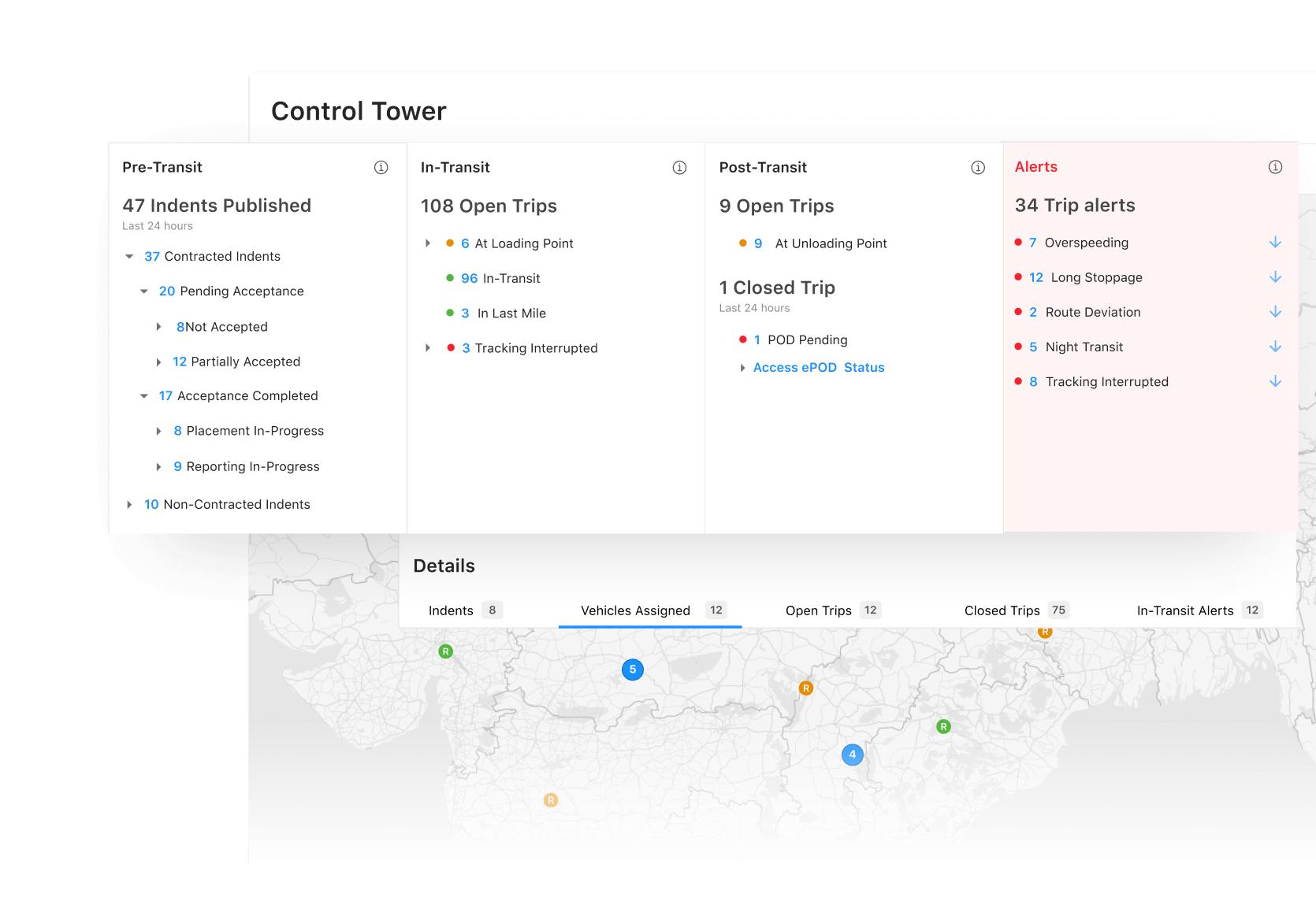
Earlier Control Tower experience: shipment-stage summaries and alert counts provided an operational overview. The later redesign focused on prioritizing individual exceptions and coordinating their resolution.
Freight Tiger operations teams: A manual ticket-resolution workflow
Freight Tiger also had operations personnel working on behalf of customers, including teams deployed at client facilities.
These operators used a separate ticketing system.
When an alert occurred, a ticket was created. The operator would open it, inspect the vehicle and issue information, call the driver or transporter, record the explanation, and update or close the ticket.
For example, when a truck stopped unexpectedly, an operator might call the driver to understand whether the delay was due to loading, documentation, traffic, or another reason.
The problem was the volume.
Operators were handling large numbers of tickets, with only a few minutes available for each one.
Even routine issues required manual attention.
The underlying problem
Both experiences were useful, but they solved different pieces of the same operational problem.
Consignors primarily needed awareness and escalation.
Freight Tiger operators needed efficient investigation, ownership, and resolution.
There was no sufficiently unified experience connecting visibility, priority, assignment, and action.
We had systems for showing problems and recording tickets, but the process of deciding what deserved attention and moving it toward resolution still depended heavily on people.
3. Why the Existing Approach Wasn’t Enough
As the product evolved, we identified three major opportunities.
Problem 1: Alert volume did not reflect alert importance
A long stoppage and a route deviation could appear as separate tickets, but their operational importance depended on the customer’s business.
For one customer, a route deviation might be critical because the vehicle was carrying sensitive cargo.
For another, a long stoppage near a loading facility might be more important because it could affect production schedules.
A single universal priority model could not represent these differences without customer-specific rules.
Operators needed a way to identify which issues required immediate attention instead of treating every alert as equally important.
Problem 2: Routine work consumed human capacity
Operators performed repetitive tasks such as calling drivers, collecting explanations, updating tickets, and checking whether an issue was still active.
This reduced the time available for complex problems that genuinely required human judgment.
The challenge was not to eliminate the operator’s role.
It was to reduce unnecessary manual intervention so operators could focus on situations with greater operational impact.
Problem 3: Resolution context was fragmented
An issue might involve several actions:
- An alert is detected.
- A driver is contacted.
- The driver does not respond.
- A transporter is contacted.
- The issue escalates.
- Another operator takes ownership.
If each action was viewed only as an isolated ticket update, the next person might struggle to understand what had already happened.
We needed a clearer way to communicate the complete history of an exception.
The design problem
How might we help operations teams prioritize thousands of exceptions, automate repetitive activities, and ensure that humans can understand and control the resolution process?
4. Project Evolution and My Contribution
Control Tower was not a product that started from a blank canvas.
An earlier design direction had already established the need for operational monitoring and visibility into transportation exceptions.
My work came later, as the requirements expanded toward issue prioritization, AI-assisted handling, and coordinated resolution.
The product needed to evolve from showing operational information to supporting the people and agents responsible for acting on it.
My design contributions focused on:
- Customer-specific alert prioritization: Translating configurable business priorities into an understandable triage experience.
- Alert queue redesign: Organizing the table around issue identity, ownership, SLA, and elapsed duration.
- Alert details layout: Separating operational context from actions and resolution history.
- Human–AI collaboration: Making AI activity visible and supporting human intervention.
- State-driven workflows: Representing alert progression, assignment, escalation, and resolution consistently.
The goal was to build on the earlier foundation while addressing a new set of operational requirements.
5. Finding Inspiration in Healthcare Triage
One of the most useful ideas came from looking outside the logistics industry.
Healthcare emergency departments face a familiar problem: a large volume of incoming cases, different levels of severity, and limited resources.
Patients are assessed based on urgency and directed to the appropriate level of care.
We explored applying a similar principle to logistics exceptions.
Instead of treating every alert as equally actionable, we wanted the system to help determine:
- How serious is this issue?
- How quickly does someone need to act?
- Can it be monitored or handled automatically?
- When should a human take over?
- Has the situation become more severe?
Four priority levels
We used four primary severity levels:
- P0 — Critical
- Highest operational urgency. Immediate human attention.
- P1 — High
- Significant operational risk. Prioritized human intervention.
- P2 — Medium
- Manageable operational risk. AI-assisted handling where permitted.
- P3 — Low
- Routine or lower-risk event. Automated monitoring or resolution where permitted.
Two additional categories—On Hold and Expired—represent workflow states, not additional severity levels.
This separation is important.
An alert’s priority describes its urgency, while its workflow state describes what is happening to it.
Why customer configuration matters
Clients supplied their standard operating procedures (SOPs), which defined how exceptions should be prioritized and handled. We used those SOPs to place alerts into the appropriate priority buckets, rather than applying one universal priority model to every customer.
Priority is not determined solely by the type of alert.
A customer may define route deviations as critical, while another may be more concerned about long stoppages or delays affecting specific facilities.
Rules can consider the customer’s operational needs, SLA thresholds, shipment context, and other available signals.
The design needed to support consistent prioritization while allowing the underlying rules to reflect different businesses.
An alert’s priority could also change as its conditions changed.
This meant priority was part of the alert lifecycle, not simply a permanent label assigned when the alert was created.
6. Designing the Unified Control Tower
We designed Control Tower as an orchestration layer connected to existing Freight Tiger modules.
Journey tracking, planning, invoicing, and other systems could generate operational exceptions.
Control Tower brought those exceptions into a more structured management experience.
The same underlying exception data could support two user needs.
Alerts for consignors
Consignors needed to understand which shipments were affected, how severe the issue was, and whether follow-up or escalation was necessary.
Tickets for operations teams
Freight Tiger operators needed a more action-oriented experience.
They had to understand current ownership, remaining SLA time, previous actions, and what they should do next.
Rather than requiring two completely unrelated systems, we designed around a shared exception lifecycle while adapting the experience to each role.
The architectural idea was shared exception information, with role-appropriate ways of consuming and acting on it.
7. Key Design Decision 1: Turn the Alert List into a Prioritized Work Queue
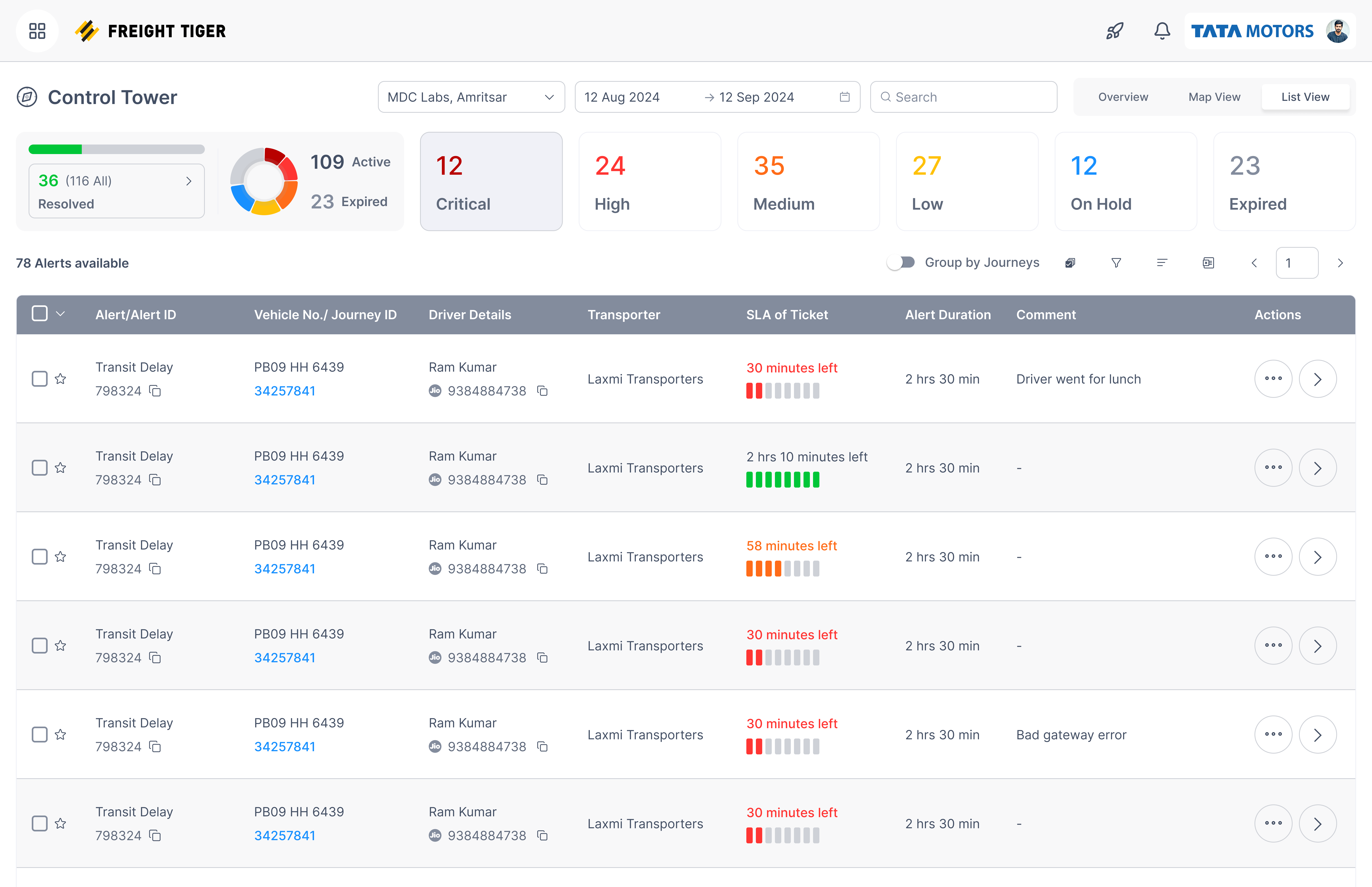
The alert-list screen became the primary starting point for operations teams.
I organized the experience around three layers of information.
Layer 1: Understand overall operational health
At the top of the page, summary components expose resolution progress, active issues, expired issues, and counts across the four priority levels.
The purpose was to give operators a quick understanding of the current workload.
Priority cards also provide a direct way to narrow the queue.
Instead of manually inspecting a long list, users can start with the most urgent category.
Layer 2: Identify the correct ticket
The table contains the operational information needed to identify and investigate an issue:
Issue identification
- Alert type and alert ID
- Vehicle number and journey ID
Contact and operational context
- Driver information
- Transporter information
Resolution management
- Assigned AI or human agent
- SLA time remaining
- Alert duration
- Available actions
This arrangement separates relatively stable information about the journey from dynamic information about the ticket’s resolution.
Layer 3: Understand urgency and ownership
Two fields are particularly important.
SLA of Ticket communicates the remaining time associated with an operational commitment.
Alert Duration communicates how long the issue has been active.
These are not interchangeable.
A ticket that has been open for several hours may still have time available before its SLA expires.
Another ticket may have been opened recently but require immediate action because its remaining SLA is very short.
Showing both allows operators to evaluate urgency with more context.
The Agent column also communicates whether an AI agent or a human operator is currently responsible.
This helps operators understand ownership before opening the ticket.
Grouping alerts by journey
The interface also includes an option to group alerts by journey.
This addresses situations where multiple exceptions are associated with the same transportation movement.
Grouping helps preserve the relationship between issues rather than presenting them as completely disconnected records.
Design rationale
The table wasn’t meant to display every available data point. It was meant to help an operator decide which ticket to investigate next.
8. Key Design Decision 2: Separate Operational Context from Resolution Actions
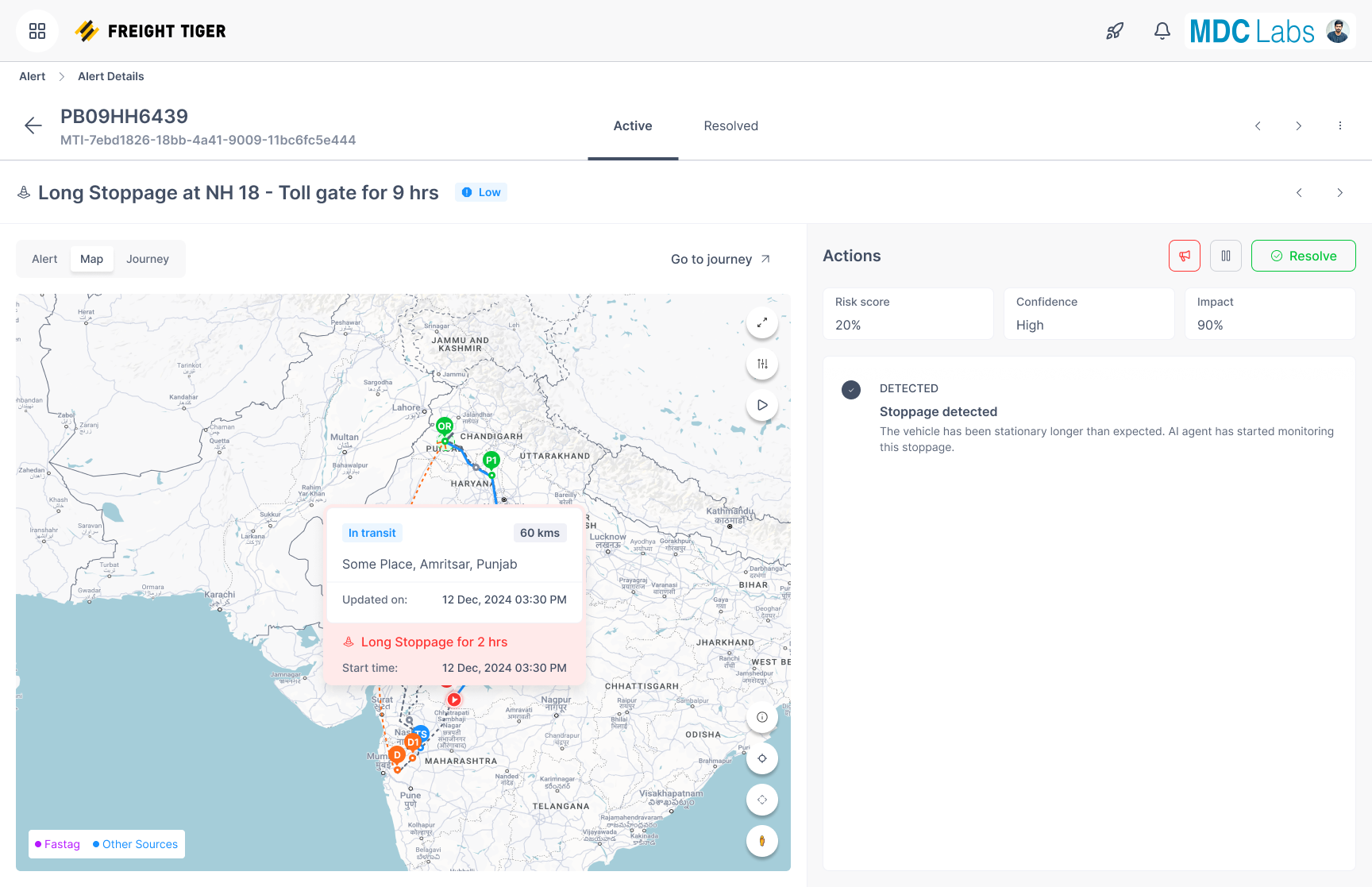
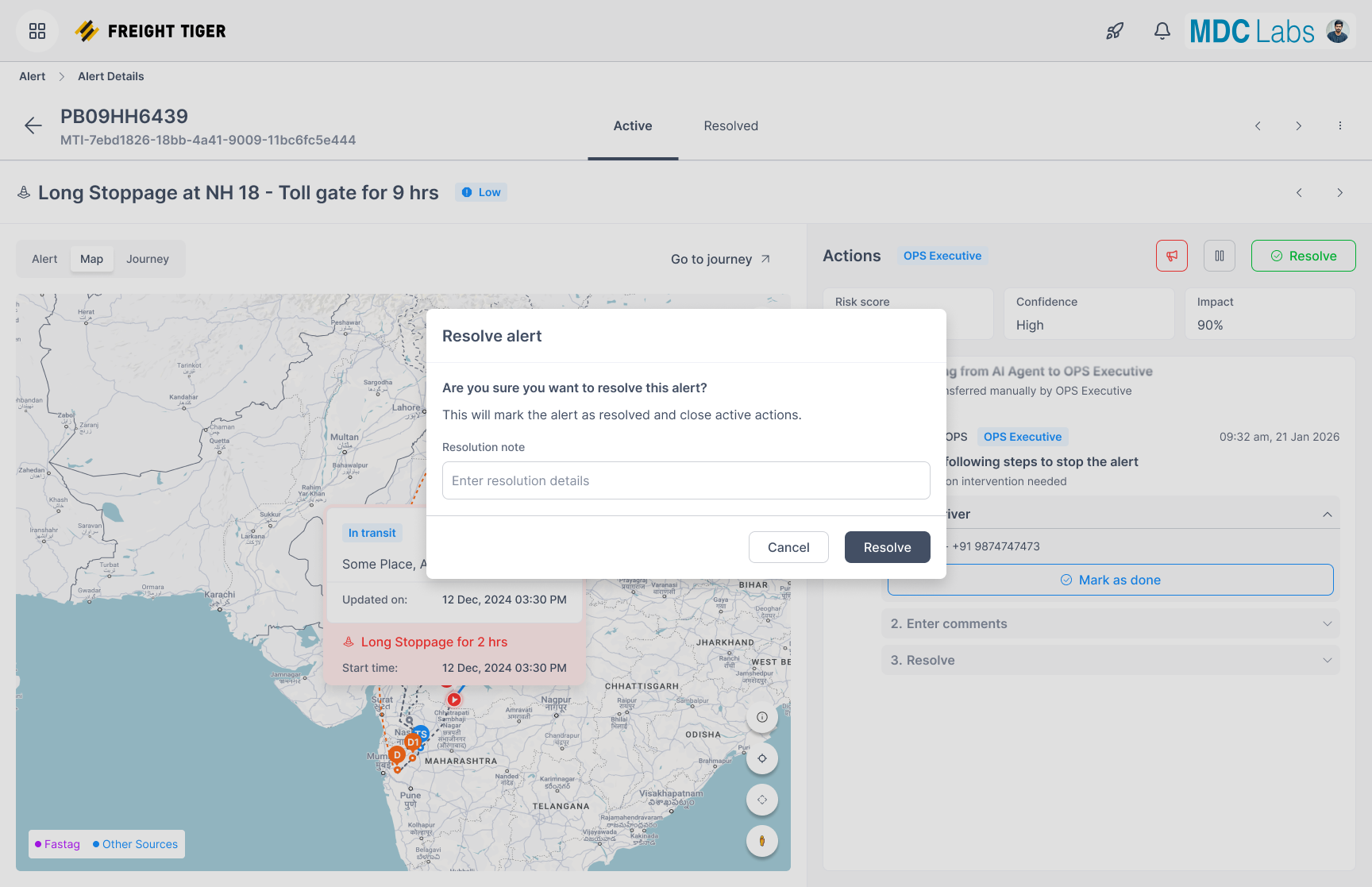
When users open an alert, the interface is divided into two primary areas.
Left: Operational context
The left side focuses on understanding the real-world situation.
It includes:
- vehicle and alert information
- current priority and state
- map and route context
- vehicle location
- journey details
- supporting alert information
- access to the audit trail
For a logistics operator, location matters.
A stopped vehicle near a loading facility creates a different operational situation from a vehicle stopped on a highway.
The map provides context that helps users interpret the alert rather than relying only on a text description.
Right: Actions and resolution progress
The right side focuses on what has been done and what needs to happen next.
It includes:
- current agent assignment
- risk, confidence, and impact indicators
- activity history
- AI-agent actions
- failures or pending confirmations
- available intervention controls
Why the split layout?
I wanted users to understand the situation and act on it without continually moving between separate screens.
The left side answers:
Where is the vehicle, and what is happening?
The right side answers:
Who is working on the issue, what has happened so far, and what action is required?
This division separates contextual investigation from operational execution while keeping both visible.
9. Key Design Decision 3: Treat Every Alert as an Evolving Story
One of the most important interaction decisions was the activity timeline.
A conventional ticket-details page often emphasizes the current status and a set of fields.
But an exception-management workflow is inherently chronological.
An issue can move through several stages, and each stage changes what the next operator needs to know.
Example: Long stoppage
Imagine a vehicle has stopped longer than expected.
Step 1 — Detection
The system identifies that the vehicle has remained stationary beyond its configured threshold.
Step 2 — Assignment
An AI agent is assigned to monitor or investigate the issue.
Step 3 — Automated outreach
The agent attempts to contact the driver through an automated calling workflow.
Step 4 — Failure or uncertainty
The driver is unreachable, or the response does not provide enough information.
Step 5 — Escalation
Depending on customer rules, priority, and SLA risk, the issue may require further outreach or human intervention.
Step 6 — Human takeover
An operator receives the unresolved issue and can review previous actions before continuing.
Step 7 — Resolution
The issue is verified, its resolution is recorded, and the appropriate closure process is completed.
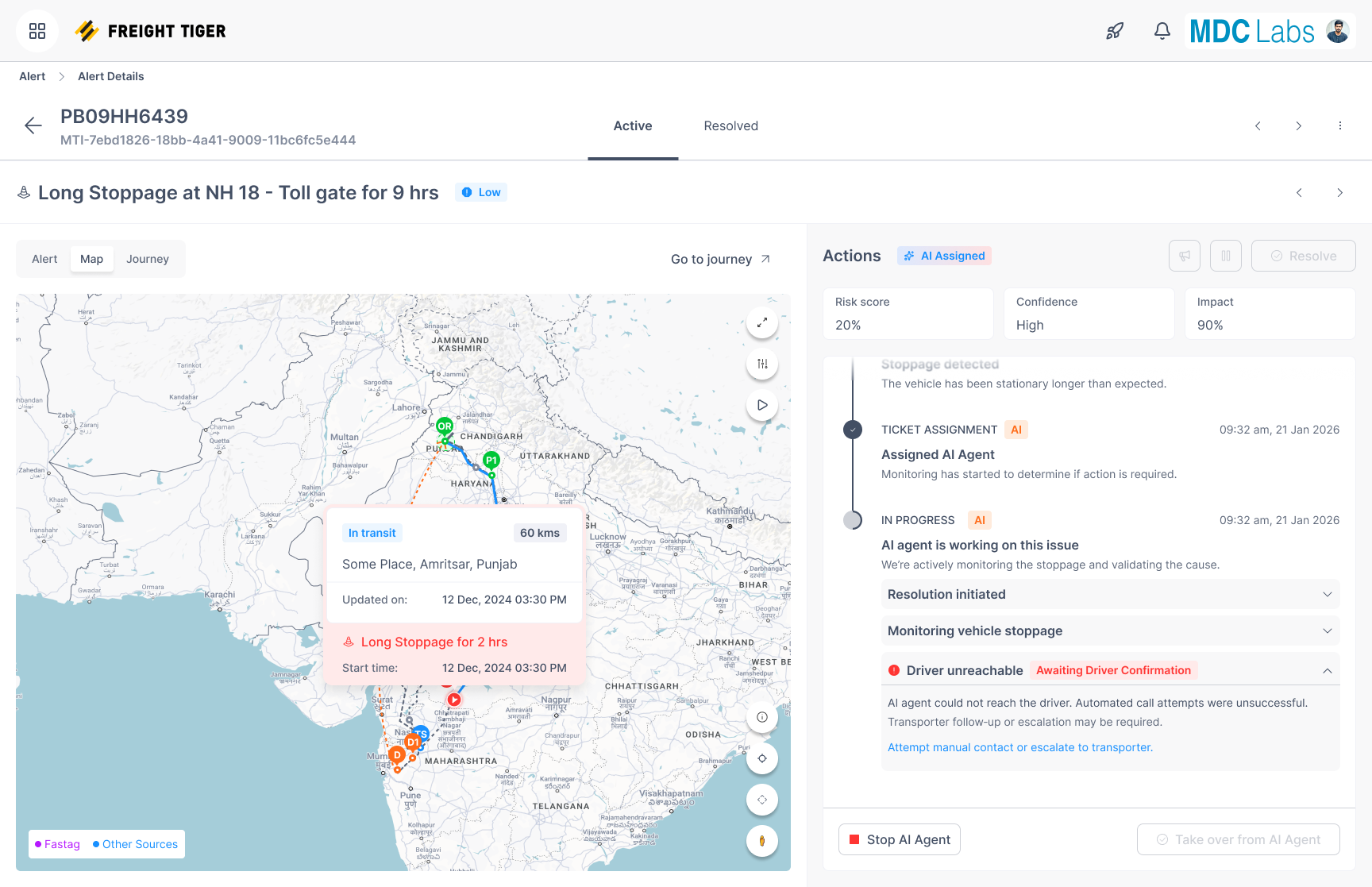
What the timeline communicates
Each activity can communicate:
- what happened
- who performed the action
- when it happened
- whether it succeeded or failed
- what the current state means
- what action may be required next
The timeline provides continuity across AI and human involvement.
Why this matters
Without a clear history, an operator taking over might repeat an unsuccessful driver call or lose time reconstructing previous activity.
With a chronological view, the operator can understand the issue’s progression before acting.
The alert becomes a shared operational record rather than an isolated notification.
10. Integrating AI Calling Agents into the Workflow
A major new requirement was integrating AI-driven voice interactions.
We worked with calling-agent capabilities using ElevenLabs so automated agents could contact drivers and gather information about operational exceptions.
For example, an AI agent handling a long-stoppage alert could attempt to understand whether the driver was waiting for loading, facing a documentation issue, or experiencing another delay.
The goal was to reduce repetitive work that previously required a human operator for every ticket.
However, introducing AI created new design questions.
How does the operator know what the agent is doing?
What happens if the driver doesn’t answer?
What if the agent misunderstands the response?
What happens when an issue becomes critical?
How can a human intervene safely?
These questions shaped the human–AI workflow.
11. Key Design Decision 4: Controlled AI Autonomy
Design principle: AI assists. Humans control.
We did not want AI automation to operate without appropriate restrictions.
The approach combined client-provided SOPs, ticket priority, and AI confidence to decide which tickets AI agents could take.
AI agents took lower-priority tickets only when the client’s SOP permitted automated handling and AI confidence was high. Lower priority alone was not sufficient, and high confidence did not override the client’s SOP.
Client-provided SOPs
Clients supplied the SOPs that defined which situations mattered to their operations, how alerts mapped to priority buckets, and how those alerts should be handled.
These rules could account for alert category, priority, elapsed time, and SLA thresholds. They established the boundaries for automated handling and human intervention.
AI confidence
Within those SOP boundaries, AI confidence determined whether an agent could take a lower-priority ticket. High-confidence, lower-priority tickets could be assigned to AI agents; tickets that did not meet those conditions required human handling.
This allowed AI agents to take routine work while operators focused on higher-priority issues and situations requiring human judgment.