Aftercrop
Mobile-first warehouse operations software — A Konic Technologies Product
Overview
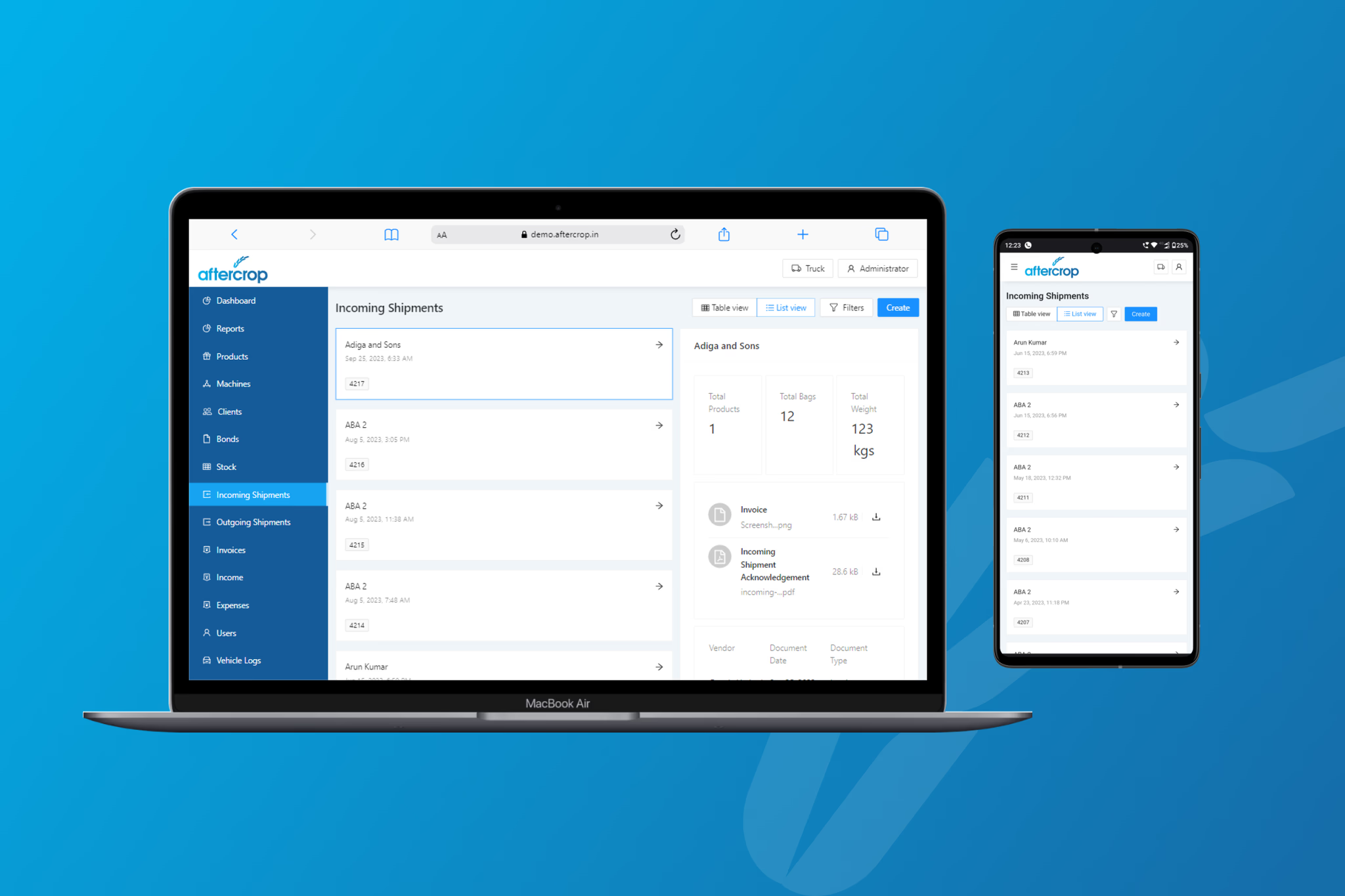
In India, medium-sized warehouses and cold storage are disorganised but vital for farmers and reducing food waste. Current tracking methods are outdated and complex. Our goal was to create user-friendly, mobile-first software to simplify warehouse operations.
User Research
Interviews
Through user interviews, we delved into the experiences and frustrations of warehouse stakeholders. A common thread emerged: existing solutions lacked emphasis on design and ease of use, especially on mobile devices.
Ethnographic Studies
By conducting ethnographic studies, we dissected the cluttered interfaces of current warehouse management systems. The findings highlighted a gap: a delightful, user-friendly solution was missing, both on mobile phones and desktops.
Competitive Analysis
Thoroughly examining existing products revealed a pattern of complex interfaces designed for desktop use. The market lacked a product that caters to both mobile and desktop users with equal proficiency.
Key Findings
- 01 Design & Usability — Several products attempt to solve warehouse management, but almost all lack emphasis on design and ease of use. The software looks like it was designed for desktops by older generations — lots of functionality packed into clunky interfaces. None works well on a phone.
- 02 Adaptability — Every product tried to introduce new workflows that warehouses are not familiar with, causing too much disruption. We interviewed customers who built in-house solutions only to end up with staff unable to adapt because of interface complexity. There's a strong need for a solution that even unskilled staff can pick up quickly because it fits their existing workflow.
- 03 Affordability — Large warehouses use enterprise products like SAP because they can afford a team to set it up. But mid to small-sized businesses can't afford expensive customisable products and a team to configure them. There's scope for an off-the-shelf product that just works for 90% of use cases.
- 04 Availability & Security — Some products are only available as on-premise installations. Cloud-based solutions existed but were poorly implemented. Customers had strong concerns about data security, and downloading data offline for spreadsheet-based reporting was an important unmet need.
Target Audience
There are several groups of target audiences with varying literacy levels. Staff in some rural warehouses might have never used a computer. Some warehouse owners are power users. To cater to the lower denominator, we kept the app extremely simple — while also providing powerful features for advanced users.
- 01 Owners / Power Users — Comfortable with phones and computers. Need dashboard-like pages with summaries and reports across different time intervals. When owners aren't experts, they usually hire an accountant who passes along the summary.
- 02 Managers — Take care of day-to-day activities, usually carry a phone and are good at tracking with pen and paper. Shifting to digital can be disruptive unless the process is extremely easy and takes the same time as physical records. Some were very receptive; some showed resistance.
- 03 Staff / Workers — Own a phone but can't do more than input minimal information. Pages for them have to be very simple and extremely easy to use. Usually not disruptive if built with the required simplicity.
Defining the USP
After conducting several interviews with different target audiences, visiting warehouses and cold storages, and observing day-to-day operations, we arrived at three key selling points.
- — Design takes precedence — We identified design and usability as the one thing that can make a mark — the biggest USP that none of the other products focuses on.
- — Least disruption — We kept the process similar to the current pen-and-paper workflow so users could be onboarded and get familiar as soon as possible.
- — Portability — Mobile interfaces are a must. Managers spend significant time on the app and are usually only comfortable using a phone. They move around the warehouse a lot — having a mobile interface to quickly review information has a huge impact.
The Solution
We started with three focus areas for the initial prototype: mobile-first usability, keeping the process as close as possible to how warehouses already work, and building enough control into the system so owners could trust the data.
Focus 1: Easy to use mobile-first design
Tables vs Lists and Cards
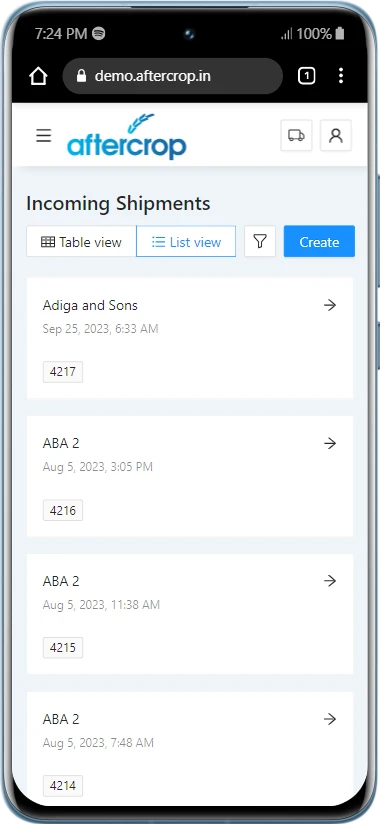
Tables are the most prominent way of displaying information, but they are terrible interfaces for small screens like mobile phones. We replaced report-style tables with cards and lists, carefully choosing just the right amount of information for each view.
We kept some of the interaction language similar to native mobile apps so users who had never used web software before would not find it disruptive. The goal was a continuous flow of information from the first list to the most detailed record.
As little typing as possible
Selection inputs over keyboard-heavy forms
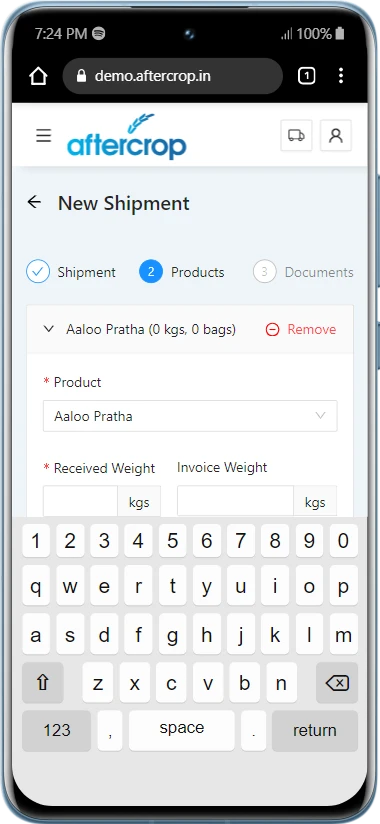
We used intuitive UI elements like switches and selection inputs so users could skip typing whenever possible. Taps, swipes, and right-place actions mattered more than forcing long form filling on a phone.
Because the app was easy to use, there was no separate training phase needed for adaptation. Most users felt comfortable within a day or two, and the product was fast enough that they were not waiting around on loading screens.
Focus 2: Process as similar as possible to the current flow
Simplifying the most used screen
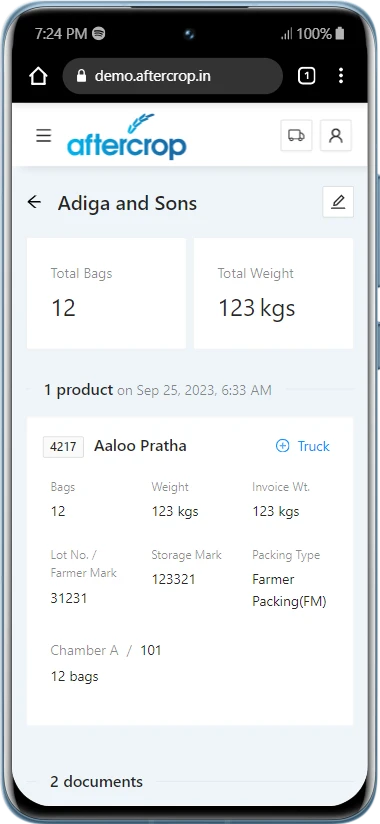
The incoming shipment flow was the most important page in the application. After repeatedly observing unloading operations and interviewing managers, we saw the same pain point: too many handwritten receipts and ledger entries to track while stock was being received.
We reduced the flow into three clear sections and optimized for one metric: the time it takes a manager to complete the form. For a minimal submission, a manager could add an entire incoming shipment in a couple of minutes.
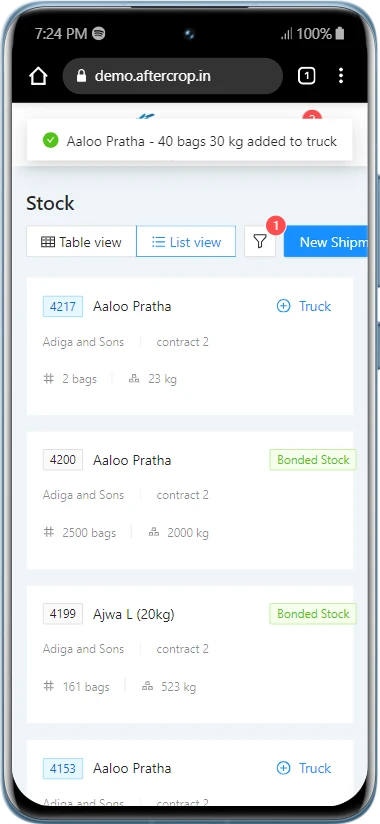
A familiar add-to-cart like experience
Stock turned into a picking workflow
The next most important workflow was outgoing shipment creation. Managers needed to select the right stock locations, update balances, and move items into a truck without spending time in tedious forms.
We visualized the outgoing flow as something closer to an add-to-cart experience from e-commerce. A manager could pick stock directly from the list and add it to the truck, leaning on powerful filtering instead of filling repeated forms.
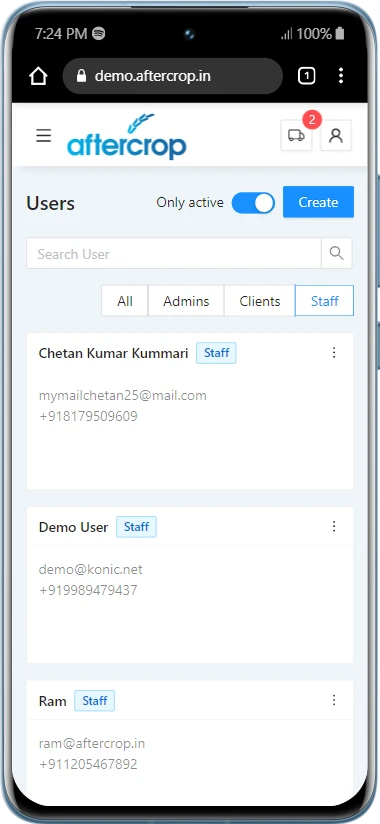
Focus 3: Data security
User roles and permissions
One of the most common customer requirements was simple: a warehouse manager should not be able to edit a record unless an admin approves it. Owners needed control without turning the product into an enterprise setup project.
We introduced role-based access so each user reflected a real warehouse responsibility. Owners could allow creation while restricting edits or deletes, which made the system safer without making it harder to use.
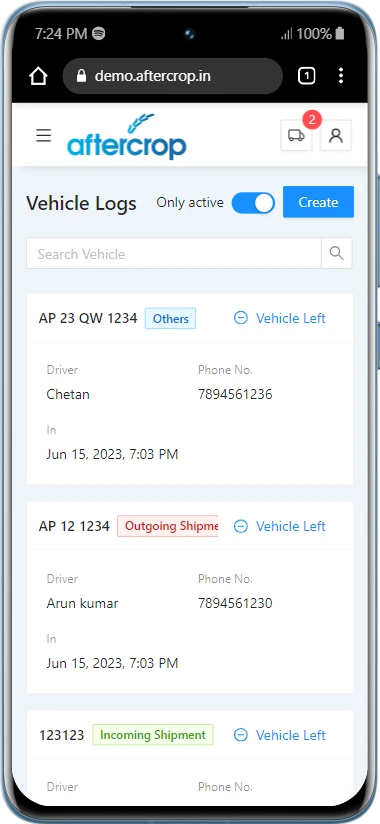
Even the security guard can use it
Vehicle logs with minimal input
A full audit of vehicles entering and leaving the warehouse becomes critical during emergencies, but the people working at the gate are often not comfortable with complex software.
The vehicle logs page became one of the simplest screens we built. It focused on one primary field, the vehicle number, and a single clear action: mark when the vehicle left. That kept the workflow usable for the people who actually needed to perform it.
Launch & Iteration
We launched the MVP in around 3 months and kept our ears wide open for feedback. We proactively initiated conversations with customers and kept them in the loop.
We released changes 2-3 times per week. Continuous customer conversations and feedback loops allowed us to fix usability issues quickly while understanding more about how the application was being used every day.
The Future
- — Customisation — Several customers have specific terminology and inputs unique to their warehouses. Customising terminology and fields across the application for each customer was the next priority.
- — Billing & Invoices — Interviews revealed that several billing models need to be supported — per-day billing, lease model billing — all while being easy to use. This was one of the biggest planned features.
# Aftercrop
> Mobile-first warehouse operations software — A Konic Technologies Product

- Role: Product Designer & Co-Founder
- Company: Konic Technologies
- Timeline: 2021 - 2023

## Overview

In India, medium-sized warehouses and cold storage are disorganised but vital for farmers and reducing food waste. Current tracking methods are outdated and complex. Our goal was to create user-friendly, mobile-first software to simplify warehouse operations.

## User Research

### Interviews

Through user interviews, we delved into the experiences and frustrations of warehouse stakeholders. A common thread emerged: existing solutions lacked emphasis on design and ease of use, especially on mobile devices.

### Ethnographic Studies

By conducting ethnographic studies, we dissected the cluttered interfaces of current warehouse management systems. The findings highlighted a gap: a delightful, user-friendly solution was missing, both on mobile phones and desktops.

### Competitive Analysis

Thoroughly examining existing products revealed a pattern of complex interfaces designed for desktop use. The market lacked a product that caters to both mobile and desktop users with equal proficiency.

## Key Findings

1. Design & Usability - Several products attempt to solve warehouse management, but almost all lack emphasis on design and ease of use. The software looks like it was designed for desktops by older generations — lots of functionality packed into clunky interfaces. None works well on a phone.
2. Adaptability - Every product tried to introduce new workflows that warehouses are not familiar with, causing too much disruption. We interviewed customers who built in-house solutions only to end up with staff unable to adapt because of interface complexity. There's a strong need for a solution that even unskilled staff can pick up quickly because it fits their existing workflow.
3. Affordability - Large warehouses use enterprise products like SAP because they can afford a team to set it up. But mid to small-sized businesses can't afford expensive customisable products and a team to configure them. There's scope for an off-the-shelf product that just works for 90% of use cases.
4. Availability & Security - Some products are only available as on-premise installations. Cloud-based solutions existed but were poorly implemented. Customers had strong concerns about data security, and downloading data offline for spreadsheet-based reporting was an important unmet need.

## Target Audience

There are several groups of target audiences with varying literacy levels. Staff in some rural warehouses might have never used a computer. Some warehouse owners are power users. To cater to the lower denominator, we kept the app extremely simple — while also providing powerful features for advanced users.

1. Owners / Power Users - Comfortable with phones and computers. Need dashboard-like pages with summaries and reports across different time intervals. When owners aren't experts, they usually hire an accountant who passes along the summary.
2. Managers - Take care of day-to-day activities, usually carry a phone and are good at tracking with pen and paper. Shifting to digital can be disruptive unless the process is extremely easy and takes the same time as physical records. Some were very receptive; some showed resistance.
3. Staff / Workers - Own a phone but can't do more than input minimal information. Pages for them have to be very simple and extremely easy to use. Usually not disruptive if built with the required simplicity.

## Defining the USP

After conducting several interviews with different target audiences, visiting warehouses and cold storages, and observing day-to-day operations, we arrived at three key selling points.

- Design takes precedence - We identified design and usability as the one thing that can make a mark — the biggest USP that none of the other products focuses on.
- Least disruption - We kept the process similar to the current pen-and-paper workflow so users could be onboarded and get familiar as soon as possible.
- Portability - Mobile interfaces are a must. Managers spend significant time on the app and are usually only comfortable using a phone. They move around the warehouse a lot — having a mobile interface to quickly review information has a huge impact.

## The Solution

We started with three focus areas for the initial prototype: mobile-first usability, keeping the process as close as possible to how warehouses already work, and building enough control into the system so owners could trust the data.

### Tables vs Lists and Cards

- Focus 1: Easy to use mobile-first design

Tables are the most prominent way of displaying information, but they are terrible interfaces for small screens like mobile phones. We replaced report-style tables with cards and lists, carefully choosing just the right amount of information for each view.

We kept some of the interaction language similar to native mobile apps so users who had never used web software before would not find it disruptive. The goal was a continuous flow of information from the first list to the most detailed record.

### Selection inputs over keyboard-heavy forms

- As little typing as possible

We used intuitive UI elements like switches and selection inputs so users could skip typing whenever possible. Taps, swipes, and right-place actions mattered more than forcing long form filling on a phone.

Because the app was easy to use, there was no separate training phase needed for adaptation. Most users felt comfortable within a day or two, and the product was fast enough that they were not waiting around on loading screens.

### Simplifying the most used screen

- Focus 2: Process as similar as possible to the current flow

The incoming shipment flow was the most important page in the application. After repeatedly observing unloading operations and interviewing managers, we saw the same pain point: too many handwritten receipts and ledger entries to track while stock was being received.

We reduced the flow into three clear sections and optimized for one metric: the time it takes a manager to complete the form. For a minimal submission, a manager could add an entire incoming shipment in a couple of minutes.

### Stock turned into a picking workflow

- A familiar add-to-cart like experience

The next most important workflow was outgoing shipment creation. Managers needed to select the right stock locations, update balances, and move items into a truck without spending time in tedious forms.

We visualized the outgoing flow as something closer to an add-to-cart experience from e-commerce. A manager could pick stock directly from the list and add it to the truck, leaning on powerful filtering instead of filling repeated forms.

### User roles and permissions

- Focus 3: Data security

One of the most common customer requirements was simple: a warehouse manager should not be able to edit a record unless an admin approves it. Owners needed control without turning the product into an enterprise setup project.

We introduced role-based access so each user reflected a real warehouse responsibility. Owners could allow creation while restricting edits or deletes, which made the system safer without making it harder to use.

### Vehicle logs with minimal input

- Even the security guard can use it

A full audit of vehicles entering and leaving the warehouse becomes critical during emergencies, but the people working at the gate are often not comfortable with complex software.

The vehicle logs page became one of the simplest screens we built. It focused on one primary field, the vehicle number, and a single clear action: mark when the vehicle left. That kept the workflow usable for the people who actually needed to perform it.

## Launch & Iteration

We launched the MVP in around 3 months and kept our ears wide open for feedback. We proactively initiated conversations with customers and kept them in the loop.

We released changes 2-3 times per week. Continuous customer conversations and feedback loops allowed us to fix usability issues quickly while understanding more about how the application was being used every day.

## The Future

- Customisation - Several customers have specific terminology and inputs unique to their warehouses. Customising terminology and fields across the application for each customer was the next priority.
- Billing & Invoices - Interviews revealed that several billing models need to be supported — per-day billing, lease model billing — all while being easy to use. This was one of the biggest planned features.